

WebCampus
Transform learning outcomes and boost employee performance with WebCampus, the intuitive cloud-based LMS for online and face-to-face training.
WebCampus is a cloud-driven learning management system (LMS) designed to facilitate both online and in-person training. It boasts an easy-to-use authoring tool alongside strong security measures and integration capabilities. Discover how WebCampus can enhance your educational results and boost employee performance.
What Is WebCampus?
WebCampus is a powerful learning management system (LMS) tailored for midsize companies in diverse sectors. This all-encompassing platform enables organizations to develop, oversee, and deliver e-learning programs. It aids businesses in conserving time and resources, enhancing employee satisfaction and performance, while also ensuring adherence to legal and ethical guidelines.
What Is WebCampus Best For?
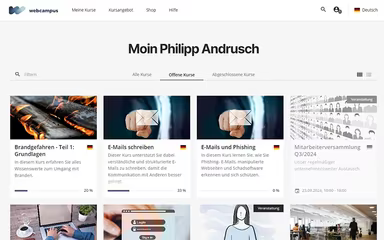
This software excels due to its gamification capabilities that enhance user engagement by integrating game-like features into the educational process. This approach turns learning into an engaging experience, rewarding participants for completing tasks and reaching milestones. Visual motivators such as a progress bar and leaderboard illustrate learners' achievements and promote a healthy competitive spirit.
WebCampus Pricing
The pricing for the software is tailored to meet your organization's unique needs. Request a personalized quote for WebCampus today.
WebCampus Integrations
The software seamlessly connects with a variety of third-party applications, including:
Active Directory
Azure Active
Microsoft 365
How Does WebCampus Work?
Once you log in, getting started with the software is straightforward:
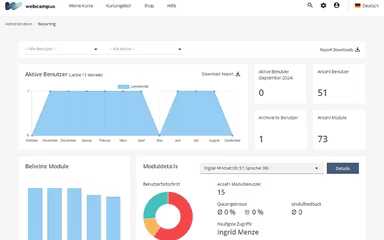
Navigate through the dashboard using the ‘Global Navigation Menu’ and sidebar.
Modify your profile settings according to your preferences.
Utilize the integrated course authoring tool to create tailored e-learning content and assign classes to your team.
Oversee participants, import user information, and access learning certificates.
Establish course programs based on hierarchies and set up role-based access permissions for employees.
Provide feedback to trainees through a unified interface.
Experience a complimentary WebCampus demo to explore its features further.
Who Is WebCampus For?
This versatile software is crafted for midsize businesses across various fields, including:
Technology
Healthcare
Finance
Retail
Manufacturing
Is WebCampus Right For You?
If you are in search of a comprehensive, user-friendly, and scalable learning management system (LMS) that meets your business needs, WebCampus is an excellent choice. This software offers outstanding scalability along with strong security measures to protect your data while ensuring compliance with legal and ethical standards.
If you're still uncertain whether WebCampus fits your requirements, reach out to our customer support team at info@softwareseekers.com for assistance in making the right choice.