

WorkRamp
Enhance your team's training with WorkRamp's intuitive LMS, featuring seamless course creation and AI Assist for personalized learning experiences.
Key Insights
Derived from customer feedback, WorkRamp is a cloud-driven Learning Management System (LMS) tailored for Human Resources, Learning and Development, and enablement teams across various sectors such as technology, healthcare, and professional services. Users appreciate its smooth course creation features. Nonetheless, some have pointed out that there are constraints regarding reporting flexibility.
Recently, WorkRamp introduced AI Assist, a new functionality designed to improve the efficiency of content creation while providing personalized recommendations for learners.
Our Assessment
WorkRamp stands out as a dependable option for medium-sized businesses in search of an integrated platform to oversee training for employees, partners, and customers. Its user-friendly interface supports scalable learning initiatives. While its pricing structure may be less attainable for smaller teams, the platform offers significant long-term benefits for organizations aiming to enhance productivity and learner engagement.
What Is WorkRamp?
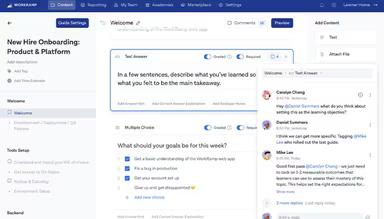
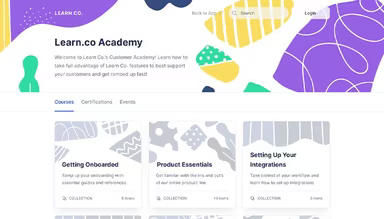
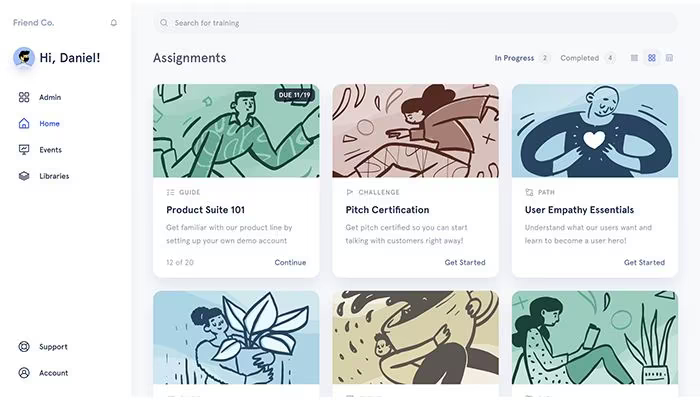
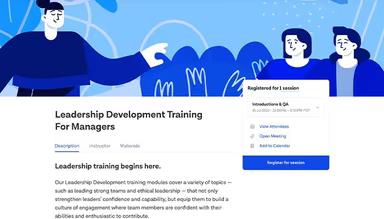
WorkRamp is an innovative cloud-based learning management system (LMS) tailored to fulfill the training requirements of businesses, partners, and customers. With a rich array of tools, organizations can effectively oversee learning programs, enhance educational experiences, and achieve superior results. The platform serves as a holistic solution for diverse learning demands, encompassing employee training, customer engagement, and integrated learning solutions. It merges an all-in-one LMS with a content marketplace and includes features such as certifications, live training sessions, analytics, and content creation capabilities.
What Is WorkRamp Best For?
A key highlight of WorkRamp is its AI-driven content creation and delivery functionalities. This feature harnesses artificial intelligence to customize users' learning experiences and streamline time management. By utilizing AI, WorkRamp adapts the content to suit learners' skill levels, interests, and job roles, thereby providing a highly tailored and effective educational journey.
How Much Does WorkRamp Cost?
The platform presents flexible pricing packages designed to cater to the unique learning needs of its clients. There are two primary pricing tiers: Employee Learning Cloud and Customer Learning Cloud, each with sub-plans available at custom pricing:
Professional
Enterprise
Reach out for a personalized quote on WorkRamp pricing today.
Note: Pricing may vary.
WorkRamp Integrations
This software seamlessly integrates with numerous third-party applications, including:
BambooHR
Rippling HR
Workday
Glean
HubSpot
How Does WorkRamp Work?
To help you get started with the WorkRamp dashboard after logging in, follow this guide:
Select 'Employees' on the left sidebar to manage learner profiles.
Access 'Library' to oversee your organizational content such as courses, learning paths, videos, presentations, etc.
Navigate to 'Catalog' for creating customized curriculums to assign to employees, teams, or departments.
Click on 'Assignments' to distribute specific content or assessments to employees on a scheduled basis.
Visit the 'Reports' section to track learner progress and engagement levels.
Utilize 'Certificates' to validate skills acquisition through verifiable records like badges and certificates.
Select the 'Engage' tab for social learning opportunities such as communities, events, and forums.
You can also arrange a complimentary WorkRamp demonstration to explore its features further.
Who Is WorkRamp For?
This LMS software is ideal for organizations of varying sizes. It is utilized by:
Financial services
Healthcare
Information technology
Professional services
Manufacturing
WorkRamp Use Cases
An analysis of user feedback reveals several key scenarios where WorkRamp excels for organizations aiming to enhance their training, onboarding, and enablement efforts:
High-Volume Employee Onboarding
Organizations that are rapidly growing or have distributed teams often face challenges in delivering consistent onboarding while managing administrative tasks. WorkRamp acts as a centralized hub where training programs specific to departments are automatically assigned based on each employee's role or location. This feature minimizes administrative overhead while ensuring uniformity across multiple locations.
Customer And External Partner Training Programs
For companies that provide training to external audiences like customers or partners, WorkRamp offers a cohesive framework for delivering, managing, and tracking external learning initiatives. The platform allows businesses to create branded learning portals and grant access to non-employees through guest invitations or self-registration links, eliminating the need for multiple training systems.
Rapid Development And Deployment Of Internal Learning
Organizations facing urgent compliance updates or regulatory changes need the ability to swiftly deploy training without relying on external vendors or protracted development cycles. WorkRamp’s user-friendly content creation tools empower internal teams to quickly develop and distribute compliance refreshers or skill-specific training in response to changing business needs, thus reducing delays in deployment and ensuring workforce alignment with new standards.
Tracking And Managing Learner Progress Across Teams
Multi-location enterprises often struggle with maintaining consistent training standards across various departments and regions. This can lead to duplicated efforts or misaligned training resources. WorkRamp centralizes all training content within one platform, ensuring uniform delivery and enhancing the learner experience across all sites.
WorkRamp User Sentiments
Most Positive Sentiments
Ease of Use & Interface: 65% positive feedback; users praise the intuitive interface and user-friendly design. Administrators find course creation straightforward without needing technical skills. One reviewer stated it's "very intuitive and easy to use LMS Software that allows you to build interactive courses."
Content Authoring & Creation Tools: 60% positive; users appreciate the efficiency of content authoring tools which allow them to create polished learning paths independently. A user remarked that it’s "flexible enough to allow us to build effective learning paths."
Customer Support & Responsiveness: 55% positive; many reviewers recognize the customer success teams for their helpfulness and responsiveness; one user noted they are "responsive, thoughtful, and genuinely invested in our success."
Least Positive Sentiments
Reporting & Analytics Depth: 30% positive; some users feel that reporting tools lack depth needed for assessing training effectiveness. One user mentioned that "the reporting capabilities are pretty limited."
Content Organization & Structural Flexibility: 30% positive; feedback indicates users desire more control over lesson structuring. One reviewer noted that they had "to scroll down" excessively to find needed information.
Advanced Customization & Scalability: 15% positive; some larger organizations express that WorkRamp does not provide sufficient customization for complex learning hierarchies.
Is WorkRamp Right For You?
If you're searching for a secure and comprehensive cloud-based LMS solution, WorkRamp is an excellent option. It offers a unified platform capable of scaling alongside your organization's learning demands—from early-stage startups to large enterprises with thousands of employees.
The software boasts strong features such as encryption, access controls, and audit logging designed to safeguard your valuable data. Many prominent LMS providers and industry leaders like Reddit, Workiva, Unity, and HashiCorp trust this software for effective training and development initiatives.
If you’re uncertain whether WorkRamp meets your LMS requirements, our experienced customer support team is ready to assist! Contact us at info@softwareseekers.com to discover how it can enhance your learning and development efforts.