

Bluebeam Revu Cost: An All-in-One Construction Project Management Tool
Boost your construction projects with Bluebeam Revu's powerful PDF markup and collaboration tools, enhancing efficiency and team communication.
Key Insights
Derived from customer feedback, Bluebeam Revu stands out as a robust solution tailored for construction experts. It provides an extensive array of features for PDF markup, team collaboration, and document management. While users currently cannot modify each other's annotations, the software greatly enhances project efficiency and team communication. Recent enhancements include the introduction of Studio Project Search, upgraded markup tools, and performance improvements that enable quicker collaboration and superior PDF management.
Our Assessment
Bluebeam Revu offers significant value for organizations managing intricate construction processes, particularly in scenarios where precision and document oversight are crucial. Its pricing is relatively high, making it more appropriate for professional teams and companies rather than individual users or very small operations. We suggest it for teams seeking improved oversight of drawings and enhanced coordination between the job site and the office.
What Is Bluebeam Revu?
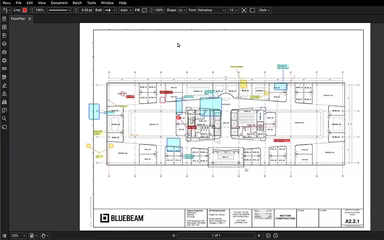
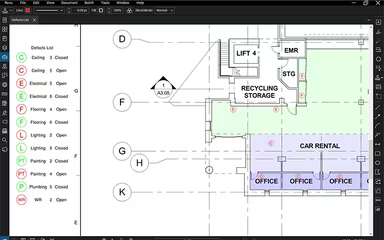
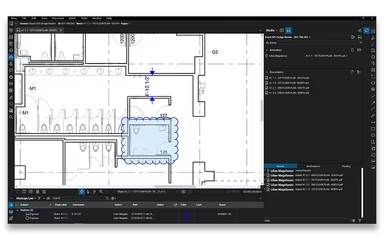
Bluebeam Revu serves as a robust software solution for managing construction projects, tailored for architects, engineers, and contractors. It enables users to create, modify, collaborate on, and distribute PDF documents seamlessly between office settings and field operations. The platform significantly optimizes project workflows through its real-time collaboration tools, which feature integrated markup options, hyperlink capabilities, permission management, and live activity monitoring to enhance team coordination.
What Is Bluebeam Revu Best For?
Renowned for its comprehensive functionality, Bluebeam Revu excels in PDF creation, editing, and markup within Microsoft Office and CAD applications. Additionally, it is frequently utilized for editing both 2D and 3D PDFs across various software and verifying measurements such as length, area, perimeter, radius, and volume.
Users can effortlessly synchronize PDFs or entire folders with services like Dropbox, Box, WebDAV, ShareFile, and Studio Projects. Even without internet connectivity, teams retain the ability to access and edit PDFs created in Revu within Studio Projects.
Initiate Studio Sessions or join existing ones to collaborate with fellow engineers in real time. You can chat and monitor any user’s view while they annotate the PDFs.
How Much Does Bluebeam Revu Cost?
The pricing for Bluebeam Revu begins at $260 per user annually for the Basics plan. There are three distinct pricing tiers designed to accommodate projects both on-site and in the office. All options include a mix of Bluebeam Revu and Bluebeam Cloud (for web and mobile platforms).
The Core tier is available at an annual rate of $330 per user and is equipped with toolsets that facilitate collaboration on small to mid-sized AECO projects. The top tier, known as ‘Complete’, costs $440 per user and provides access to the full suite of features necessary for managing office and project documents at scale.
Beyond the base subscription costs mentioned above, organizations should also consider the following estimated expenses based on industry standards:
Implementation And Setup: $500–$5,000 for small teams; $5,000–$20,000 for enterprise deployments
User Training And Onboarding: $1,000–$10,000 depending on team size and complexity of workflows
Integrations With Project Management Tools: $2,000–$15,000
Custom Workflow Automation: $3,000–$20,000 for advanced enterprise needs
If you’re uncertain about which plan to choose, feel free to connect with our solutions specialist for a tailored Bluebeam Revu cost estimate today!
Please note that pricing may vary over time.
Bluebeam Revu Software Integrations
Bluebeam Revu allows users to integrate with various applications to streamline workflows and maximize their technological resources. Some notable software integrations include:
Asite
Graphisoft
Docusign
MarkedUp
Metaroom by Amrax
Raken software
Vectorworks
Dropbox
Egnyte
Google Drive
How Does Bluebeam Revu Work?
To utilize Bluebeam Revu effectively, simply log in to access a PDF-centric construction collaboration platform and follow these steps:
Select one of five preloaded Profiles in Bluebeam Revu tailored for specific tasks: Construction, Design, Estimation, Office, Simple or Tablet.
Create, view, compare, and edit multiple PDF files simultaneously while choosing markup tools such as text, notes, lines, clouds, stamps, and images that meet your project needs.
Utilize markup tools like text annotations and notes to clearly communicate project specifics through your drawings.
The platform’s customizable interface allows you to pin frequently used tools for easy access.
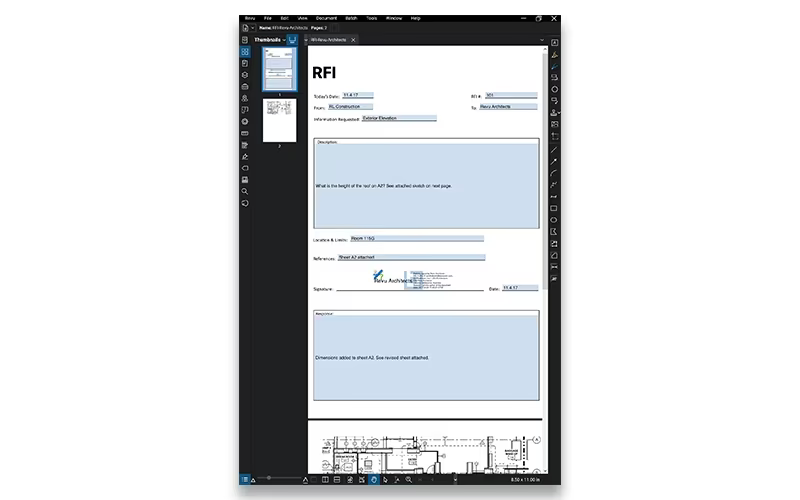
Navigational panels provide quick access to additional tabs including Bookmarks, Thumbnails, Tool Chest, Links, Properties, Search, Markups List, and Measurements.
Engage in real-time collaboration via Bluebeam Studio where teams can share files and monitor changes within Projects and Sessions.
Tailor your workspace by pinning essential tools and adjusting interface panels to enhance productivity.
Please be aware that older versions such as Revu Standard, Revu CAD, and Revu eXtreme are no longer available. To enhance security measures and accessibility options, the company has shifted towards offering more customized subscription plans focused on specific projects.
You can request a complimentary demo of Bluebeam Revu to get acquainted with its features.
Who Is Bluebeam Revu For?
As a document management tool ideal for PDF creation and annotation tasks, Bluebeam Revu is favored by a diverse range of organizations from small businesses to large enterprises. Typical users across various industries include:
Construction management professionals
Architects
Engineers
Specialist contractors
Quantity surveyors (QS)
Bluebeam Revu Use Cases
An analysis of Bluebeam Revu’s functionalities reveals several key use cases where the software is effectively employed across architecture, engineering, and construction workflows:
Construction Teams Managing Drawing Reviews And Project Markups: Construction teams utilize Bluebeam Revu to review and annotate project drawings during active phases. The platform enables multiple stakeholders to collaborate on the same PDF documents simultaneously—ensuring revisions are tracked accurately while keeping project records updated across both fieldwork and office teams.
Architecture And Engineering Firms Coordinating Design Documentation: Architects and engineers depend on Bluebeam Revu for managing technical drawings alongside design reviews throughout project lifecycles. Its measurement tools assist teams in clearly communicating design modifications while ensuring organized documentation for approvals.
Project Teams Handling Digital Document Collaboration: Organizations moving away from paper-based systems employ Bluebeam Revu to centralize project documentation. Features like Studio Sessions facilitate improved inter-departmental collaboration by managing RFIs, submittals, punch lists without relying on disconnected emails or manual tracking systems.
Contractors Managing Quantity Takeoffs And Estimation Workflows: Contractors leverage the measurement capabilities within Bluebeam Revu to calculate quantities directly from construction drawings—this reduces manual calculations while enhancing estimating accuracy which expedites bid preparation across various project sizes.
Is Bluebeam Revu Right For You And Your Business?
If your firm seeks an efficient transition from traditional paper-based processes to digital document management solutions, then Bluebeam Revu is an excellent choice. This reliable project management tool has empowered architects, engineers, and small businesses alike to share essential project information from inception through completion.
The platform is highly recommended due to its strong collaborative features that allow multiple stakeholders to annotate project drawings effectively. Additionally, its PDF editing capabilities are straightforward enough for newcomers yet robust enough for experienced users.
The software is trusted by over 4 million professionals globally—including reputable firms such as Perkins&Will, Rossetti, and STRABAG. Furthermore, Bluebeam prioritizes enterprise-grade security protocols like encrypted data handling along with controlled access management to ensure safe collaborative environments for projects.
If you're still unsure whether Bluebeam Revu suits your needs best? Reach out to our customer support team at info@softwareseekers.com for personalized assistance.