

Checkvist
Streamline your task management with Checkvist. Organize projects, publish online, attach files, and track time effortlessly.
Are you finding it difficult to keep up with your tasks? Consider Checkvist, a solution designed for effective task management that provides a simplified way to organize your tasks. With Checkvist, you can oversee your projects, share them online, and conveniently attach files while monitoring the time dedicated to each task. Dive into the features of Checkvist to enjoy improved task delegation and time oversight.
What Is Checkvist?
Overview
Checkvist is a task management solution hosted in the cloud, tailored to meet the diverse needs of its users. This robust online list-making tool provides numerous options for organization and structuring. It offers various solutions for handling tasks, calendars, and subtasks, along with bulk operational features designed to enhance your workflow.
Moreover, Checkvist allows users to monitor the percentage of task completion, proving to be an effective asset for managing both projects and tasks. It's especially advantageous for those who favor keyboard shortcuts for formatting and organizing their tasks.
What Is Checkvist Best For?
The standout feature of Checkvist is its exceptional customer support team. Users frequently commend their quick response times and helpful nature, which have enabled them to resolve issues efficiently, leading to a positive overall experience.
Additionally, the software is renowned for its keyboard-driven interface, which aids teams in advancing their work in the most streamlined and concentrated manner possible.
Checkvist Pricing
The provider has structured the pricing plans for Checkvist as follows:
Free – $0/person/month
PRO – $3.9/person/month
PRO Team – $6.9/person/month
The pricing of Checkvist varies based on your organization’s size and requirements. For a personalized pricing plan that fits your specific needs, feel free to reach out to us.
Please note that pricing may change over time.
Checkvist Integrations
Checkvist is compatible with several third-party applications, including:
Zapier
Asana
Evernote
Jira
GitHub
Gmail
Google Calendar
How Does Checkvist Work?
You can easily navigate the dashboard and utilize the software’s features by following these steps:
Log in to access the Checkvist dashboard.
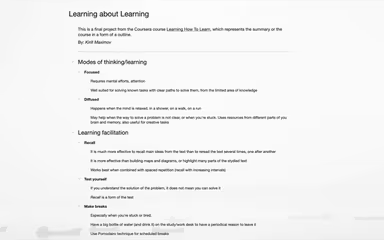
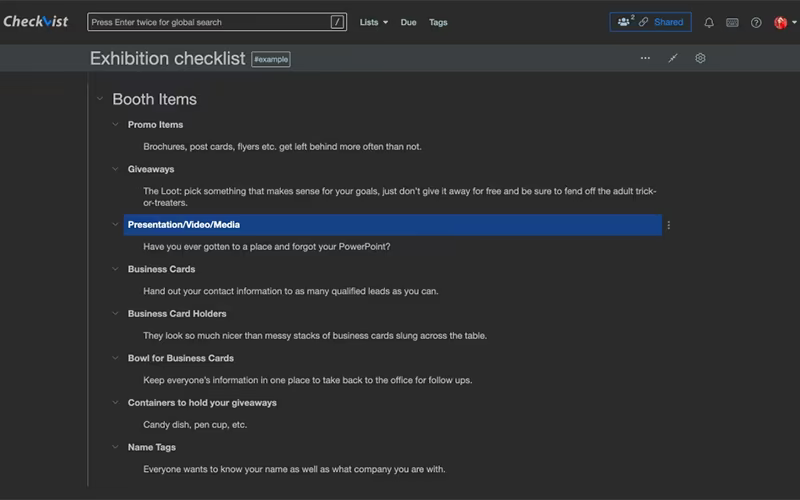
Utilize hierarchical lists to categorize ideas, notes, and tasks into groups.
Employ advanced features using keyboard shortcuts for formatting and organizing tasks.
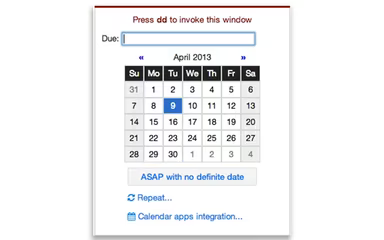
Add tags, due dates, priorities, and attachments to your tasks.
Master keyboard shortcuts for enhanced formatting and structuring of tasks.
Utilize ‘command’ mode to select list items and execute actions.
Use ‘edit’ mode to create, modify, organize, and reorganize lists.
Add due dates, tags, or other attributes using smart syntax for text formatting.
Arrange a complimentary Checkvist demo to discover more about the software’s capabilities.
Who Is Checkvist For?
This platform is particularly well-suited for small businesses in search of a dependable task management tool. The Checkvist software finds applications in various fields such as:
Education
Writing and editing
Web development
Information technology
Banking
Is Checkvist Right For You?
If you are on the lookout for task management software that excels in keyboard support, tagging, due dates, search/filtering options, and collaboration capabilities, then Checkvist may be an excellent match for you. It boasts a comprehensive set of features designed to improve your task management experience while keeping you organized and productive.
The software ensures secure data exchange through SSL channels and includes added security measures like two-step login verification.
If you are still uncertain whether Checkvist suits your needs, feel free to contact us at info@softwareseekers.com. Our customer support team is ready to assist you in making an informed choice.