

ClickUp Software
Boost your team's efficiency with ClickUp, the all-in-one solution for task management, communication, and goal tracking. Start collaborating seamlessly today!
ClickUp brings together all the essential tools your team requires, including task management, communication, and goal tracking. This integration promotes smooth collaboration and boosts productivity. Despite its extensive array of features, newcomers may face a minor learning curve. Fortunately, ClickUp's organized interface and informative tutorials help teams quickly reach their maximum potential.
What Is ClickUp Software?
ClickUp is a cloud-driven project management solution designed to enhance task management, facilitate team collaboration, track time, and generate reports. It serves teams across various sizes and industries, enabling them to streamline work processes, manage intricate projects, and communicate effectively.
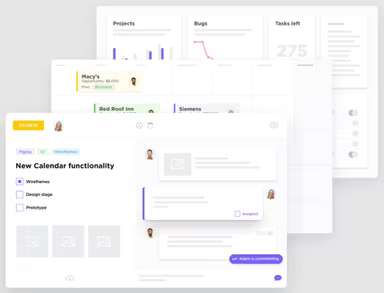
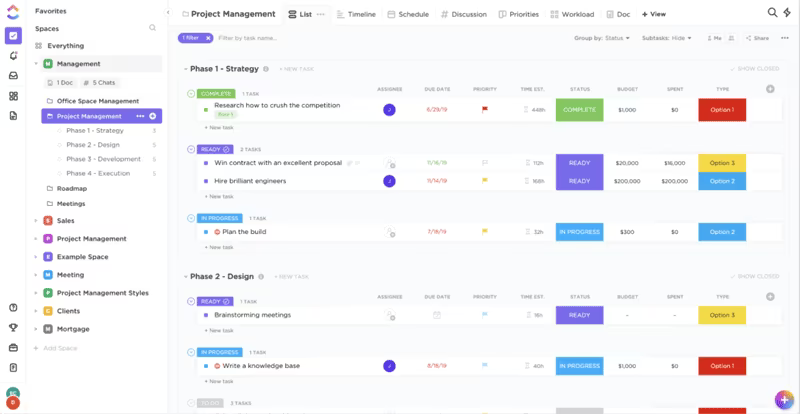
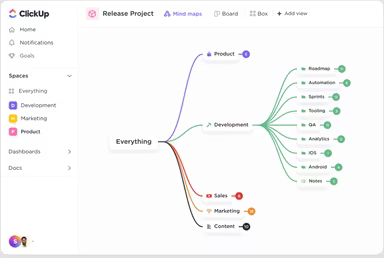
This software is packed with features aimed at boosting team productivity. It encompasses task management, time tracking capabilities, a chat interface, templates, ClickApps, diverse views, collaboration tools, and much more.
What Is ClickUp Software Best For?
ClickUp stands out for its user-friendly interface and adaptability to diverse teams across multiple sectors while offering tremendous value. This comprehensive productivity tool consolidates all your tasks into a single platform. Additionally, it features a scalable design, an appealing user interface, and numerous fully customizable options that cater to users without technical skills.
How Much Does ClickUp Cost?
The pricing for ClickUp varies based on your organization’s requirements and size. Below are the four available ClickUp pricing plans:
Free Forever – $0/user/month
Unlimited – $10/user/month
Business – $19/user/month
Enterprise – Custom pricing
For a personalized pricing estimate tailored to your organization’s specific needs, reach out for a custom quote.
Please note: The pricing may change over time.
ClickUp Software Integrations
The platform seamlessly integrates with various third-party applications, including:
Slack
GitLab
GitHub
HubSpot
Toggl
Harvest
How Does ClickUp Software Work?
Once you log into your account, here's how to navigate the dashboard and start using ClickUp:
Create a workspace for either team or personal use.
Personalize the workspace name and avatar to suit its purpose.
Create folders to categorize related projects or tasks.
Add tasks within spaces, including titles, descriptions, and deadlines.
Employ task attributes like priority levels, assignees, and tags to enhance workflow efficiency.
Utilize sorting features to arrange tasks according to priority, due dates, and more.
Invite team members to collaborate on various tasks and projects.
Set up task automation through the software’s built-in functionalities.
Schedule a free ClickUp demo to explore the platform further.
Who Is ClickUp Software For?
This project management tool is tailored for organizations of all sizes—from startups to large corporations and non-profits. The following departments commonly utilize the software:
Marketing
Software Development
Operations
Design
Human Resources
Engineering
Is ClickUp Software Right For You?
If you seek a project management solution that revolutionizes your workflow, consider ClickUp. It is the leading software in its field and is used by over 800,000 productive teams who save an entire day each week. ClickUp has garnered multiple accolades, including the Cloud Awards’ Best SaaS Award.
The software boasts notable clients such as Mayo Clinic, San Diego Padres, Finastra, Salesforce, and STANLEY Security. It is fully hosted on Amazon Web Services (AWS), ensuring comprehensive security along with built-in privacy features. The ClickUp team also takes proactive steps to maintain a secure environment. Its scalable nature makes it suitable for teams of any size.
If you have further questions about this review of ClickUp, please get in touch with our customer support at info@softwareseekers.com. They will assess the software based on your organization’s needs to assist you in making an informed choice.