

Filestage
Streamline your review and approval processes with Filestage's cloud-based solution, enhancing project workflow management across all devices.
Efficiently overseeing review and approval workflows can be challenging across various sectors, often resulting in delays and disjointed feedback. Teams struggle with managing different file formats and often find themselves without intuitive solutions that work seamlessly across devices. Filestage provides a cloud-based solution to tackle these problems. Discover its features to improve your organization’s project workflow management.
What Is Filestage?
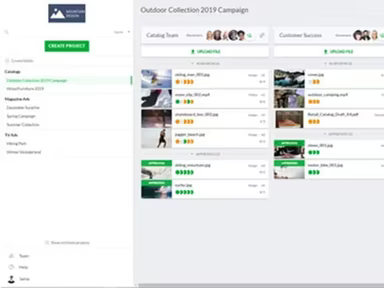
Filestage is an innovative platform hosted in the cloud, designed specifically for reviewing and approving content across various sectors. This project workflow management tool provides a centralized space for teams to share, discuss, and approve their files efficiently.
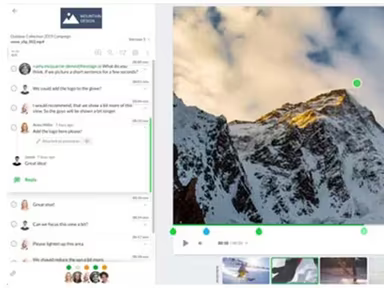
The software supports a variety of formats including documents, images, videos, websites, and audio files, effectively tackling the issues of scattered feedback and protracted approval times. Additionally, it enables creative professionals to review videos and sanction files, thereby streamlining the review process and significantly cutting down on approval durations.
What Is Filestage Best For?
Filestage is well-regarded for its straightforward and user-friendly interface. The platform’s layout emphasizes ease of use, allowing for smooth navigation and team collaboration. This intuitive experience is consistent across both desktop and mobile applications, ensuring users enjoy a seamless experience regardless of their device.
Filestage Pricing
The company provides four different pricing tiers:
Free – $0/month
Basic – $109/month
Professional – $299/month
Enterprise – Custom pricing
You can request a personalized quote for Filestage that suits your organization’s unique needs.
Please note that pricing may vary over time.
Filestage Integrations
This software works seamlessly with several third-party applications, including:
Google Drive
Dropbox
Adobe Premiere
Slack
Notion
Figma
Monday.com
How Does Filestage Work?
The following steps outline how to navigate the dashboard and utilize the software's features:
Log into your Filestage account using your credentials to reach the dashboard.
Select ‘New Project’ to initiate a new project and enter the necessary details.
Add files by clicking ‘Add Files’ within your project and organize them into folders for better clarity.
Invite colleagues or clients to review files, leave comments, and indicate changes for approval.
Keep track of different file versions by uploading revisions and comparing them with ease.
Receive email alerts for new comments and approvals to stay updated.
Monitor project progress and user engagement through analytics found under ‘Project Overview.’
Export files directly from Filestage once your project receives approval.
You may also arrange a complimentary Filestage demo for an in-depth software walkthrough.
Who Is Filestage For?
This software is tailored for businesses of all sizes, ranging from small startups to large corporations. The following sectors commonly utilize it:
Marketing
Advertising
Production
Creative
Is Filestage Right For You?
If you're in search of a robust solution to enhance your review and approval workflows, then Filestage could be just what you need. Numerous prominent clients trust Filestage, such as Sharp, Head, Lufthansa, Rabobank, and Cambridge University Press. Furthermore, the software collaborates with BrandMaster to deliver a customer-oriented platform focused on brand management and marketing with online proofing features.
Filestage employs enterprise-level AES 256 encryption that complies with ISO/IEC standards. All personal information is securely encrypted and stored in their data centers located in Frankfurt, Germany. This guarantees that your data remains protected according to the latest European regulations.
If you are still uncertain whether Filestage aligns with your needs, please reach out to us at info@softwareseekers.com. Our customer support team is ready to assist you with any inquiries you may have regarding whether Filestage meets your organizational requirements.