logo

GQueues

Finding it difficult to keep your tasks in sync across Google applications? Look no further than GQueues. This task management software, designed for the cloud...

0.00 | 0 Reviews

Finding it difficult to keep your tasks in sync across Google applications? Look no further than GQueues. This task management software, designed for the cloud...

Product Overview

Finding it difficult to keep your tasks in sync across Google applications? Look no further than GQueues. This task management software, designed for the cloud and seamlessly integrated with Google Workspace, enhances teamwork, simplifies processes, and helps your team coordinate their tasks with ease. Explore how GQueues can assist you in tackling task management hurdles within your organization.
Product Snapshot

Product Details

What Is GQueues?

Overview

GQueues is a cloud-based task management solution aimed at enhancing team productivity and organization. It streamlines the processes of task assignment, tracking, and completion, effectively addressing the challenges often encountered in team management. By keeping everyone informed about tasks and deadlines, the platform helps teams remain organized, alleviating stress and boosting overall efficiency.

What Is GQueues Best For?

GQueues stands out for its exceptional customer support team. They are quick to respond and dedicated to resolving user inquiries and problems efficiently. This dedication significantly improves the user experience and plays a crucial role in the software's overall effectiveness. Users can count on the support team for guidance in navigating the software and fully utilizing its features.

GQueues Pricing

The vendor provides three distinct pricing plans for GQueues:

  • GQueues Lite – $0/user/month

  • GQueues for YOU – $3/user/month

  • GQueues for Business – $4/user/month

Additional costs for GQueues may apply based on your specific business requirements and size.

Note: Pricing is subject to change.

GQueues Integrations

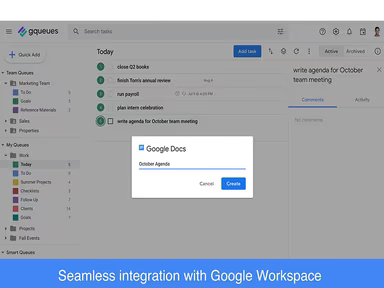
The GQueues project management software is designed to meet the needs of teams utilizing Google Workspace, featuring robust integrations with:

  • Google Calendar

  • Gmail

  • Google Drive

  • Google Contacts

How Does GQueues Work?

Here's a brief overview of how to navigate the dashboard and utilize the software's features:

  1. Log in to access GQueues.

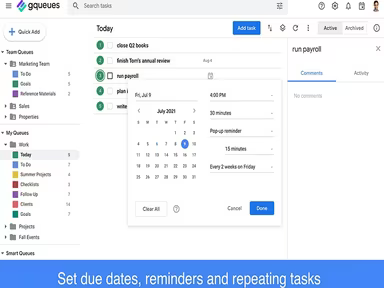
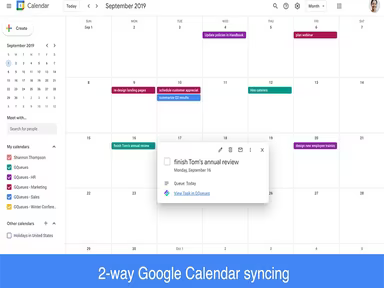
  2. Create tasks and view them in your Google Calendar.

  3. Add tasks from various sources including web, email, Calendar, Drive, and through Quick Add.

  4. Attach files to tasks to consolidate your work within a single trusted system.

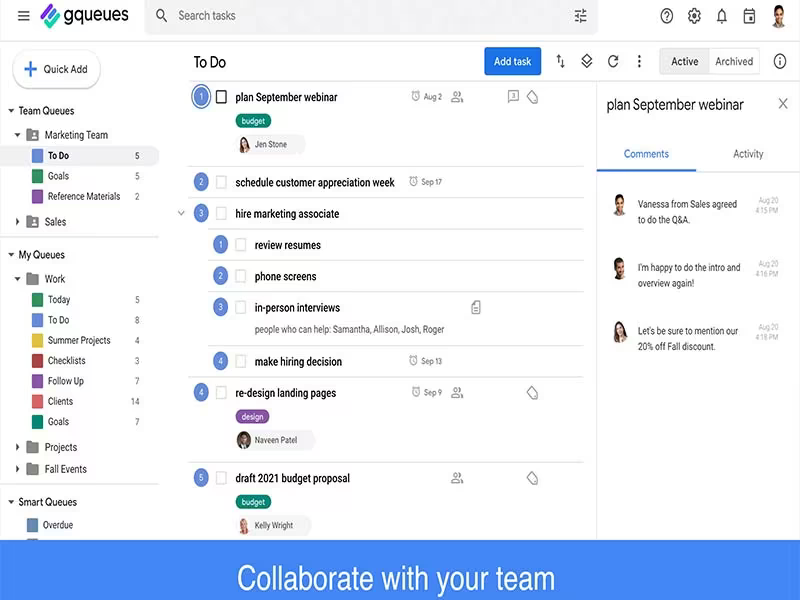
  5. Enhance collaboration with assignments, comments, notifications, and activity tracking.

  6. Access queue details and share specific queues with team members.

  7. Utilize Smart Queues and search functionalities to locate tasks in your account and generate reusable reports.

If you want to learn more about GQueues, consider scheduling a free demo.

Who Is GQueues For?

The following sectors commonly use GQueues software:

  • Fashion

  • Construction

  • Information Technology

  • Healthcare

  • Accounting

  • Hospitality

  • Media

Is GQueues Right For You?

If you're in search of a task management tool that integrates smoothly with Google Workspace while enhancing your team's productivity, then GQueues could be the perfect fit. All data entered into GQueues is encrypted both during transmission and when stored in Google’s data centers, ensuring continuous security. Built on Google App Engine within the Google Cloud Platform, this software is adaptable enough to serve teams or organizations of any size.

If you still have questions about GQueues, feel free to reach out to our customer support team at info@softwareseekers.com. They are ready to assist you with any concerns to help you make an informed choice.

Project Management Software Features

dashboard
free plan
reporting
scheduler
dashboards
free trial
mobile app
purchasing
ai features
file sharing
integrations
telemedicine
collaboration
mobile access
time tracking
bid management
patient portal
budgeting tools
e prescriptions
email marketing
lead generation
marketing tools
quality control
rent collection
task management
asset management
automation tools
custom workflows
document sharing
easy integration
expense tracking
lab integrations
lease management
maintenance logs
project tracking
shared calenders
budget management
claims management
data importexport
project templates
safety management
tenant management
time zone support
content management
customizable forms
data visualization
equipment tracking
project management
project scheduling
shop floor control
team communication
alertsnotifications
campaign management
communication tools
contract management
document management
employee engagement
employee management
employee onboarding
facility management
incident management
production planning
property accounting
reporting analytics
resource allocation
workforce analytics
financial management
inventory management
maintenance requests
patient demographics
portfolio and assets
real time monitoring
bill of materials bom
billing and invoicing
business intelligence
customer segmentation
equipment maintenance
inspection management
partner data exchange
product health scores
scalable architecture
work order management
attendee communication
customizable workflows
facilities maintenance
performance management
benefits administration
change order management
compensation management
registration management
reporting and analytics
social media management
supply chain management
workflows and approvals
business intelligence bi
communication and access
documents and compliance
manufacturing management
subcontractor management
training and development
integrated team calendars
stakeholder collaboration
access controlspermissions
human resources management
maintenance and operations
attendance and time tracking
employee self service portal
integration with erp systems
product lifecycle management
centralised product portfolio
venue and resource management
agenda and schedule management
compliance and risk management
human resources management hrm
sales and marketing automation
speaker and content management
audience interaction technology
data driven product performance
employee information management
on site and virtual event tools
project planning and scheduling
tenant and lease administration
appointment managementscheduling
product lifecycle management plm
integration with financial systems
production planning and scheduling
recruitment and applicant tracking
financial management and accounting
customer relationship management crm

Pros

  • Provides user-friendly Android and iOS mobile apps
  • Real-time syncing with Google Calendar ensures a consolidated view of tasks
  • Responsive and dedicated customer service
  • Encrypts data transmission and storage in Google data centers
  • Easily scales to meet the needs of various team sizes

Cons

  • May require some time for users to familiarize themselves with all features
  • Customization options can be improved, according to some GQueues reviews
  • Initial set-up might be time-consuming

Price

Professional

$0

Get Free Guidance from Our Solution Experts.

Ratings

0.00 | 0 reviews

Ratings Distribution

Positive

0%

Neutral

0%

Negative

0%

User Reviews

No reviews yet

Be the first to share your experience with GQueues.

Frequently Asked Questions

Find answers to the most common queries about our software recommendation service.

No, GQueues does not offer an API.

GQueues is designed for English language users.

GQueues integrates with Google Contacts, Google Drive, Gmail, and Google Calendar. It also offers a Chrome extension.

Yes, GQueues offers mobile apps for both Android and iOS devices.

The software has three pricing plans: GQueues Lite ($0/month), GQueues for You ($3/month), and GQueues for Business ($4/month). Get a custom GQueues price tailored to your company’s unique requirements.

GQueues is used in hospitality, information technology, media, accounting, healthcare, construction, and fashion industries.

GQueues offers support via their Help Center, live chat, and email.