

logo

HeySpace

HeySpace provides an intuitive solution for managing tasks and tracking progress. Discover this groundbreaking tool that integrates task management, scheduling,...

0.00 | 0 Reviews

HeySpace provides an intuitive solution for managing tasks and tracking progress. Discover this groundbreaking tool that integrates task management, scheduling,...

Product Overview

HeySpace provides an intuitive solution for managing tasks and tracking progress. Discover this groundbreaking tool that integrates task management, scheduling, and communication into a single platform. Its purpose is to boost teamwork, elevate productivity, and deliver a holistic perspective on project developments. Feel the distinction with HeySpace.
Product Snapshot

Product Details

What Is TimeCamp Planner?

Overview

TimeCamp Planner, previously referred to as HeySpace, is a cloud-driven project management tool aimed at optimizing team collaboration and boosting productivity. This comprehensive solution merges task management capabilities with the ease of a messaging platform.

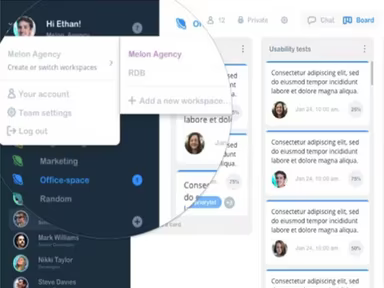
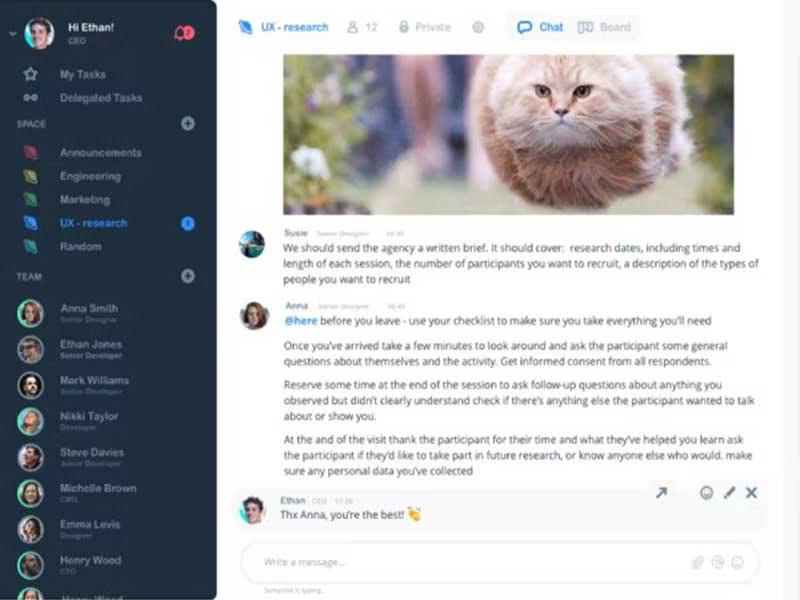
The software allows you to effortlessly generate, assign, and prioritize tasks for your team members, establish deadlines, and monitor progress through customizable boards and user-friendly layouts. Additionally, TimeCamp Planner’s integrated chat feature encourages immediate discussions, file sharing, and updates regarding project status.

What Is TimeCamp Planner Best For?

A standout aspect of TimeCamp Planner is its ability to significantly improve teamwork and collaboration. Its communication tools foster an environment where teams can easily work together, exchange ideas, and stay updated on project advancements. With options for contextual communication, file sharing, chatting, integrated project boards, and more, you can maintain transparency throughout the process.

TimeCamp Planner Pricing

The following pricing plans are available:

  • Free - $0

  • Pro - $3.99/user/month

The software provides a range of pricing options to accommodate various organizations and their changing needs. You can request a custom quote for TimeCamp Planner.

Note: Prices may vary over time.

TimeCamp Planner Integrations

This software is compatible with several third-party applications, including:

  • Zapier

  • Google Calendar

  • Trello

How Does TimeCamp Planner Work?

To get started with the software, follow these steps:

  1. Log in using your TimeCamp Planner credentials.

  2. Select the "Create Workspace" button and enter a name and description.

  3. Structure your work by creating project boards within your workspace.

  4. Customize the layout of the board (e.g., Kanban-style) and set up columns.

  5. Add tasks to your project board by clicking the "Add Task" button.

  6. Provide a title, description, deadline for each task, and assign it to a team member.

  7. Utilize the built-in chat functionality to communicate with your team members.

  8. Move tasks across columns on your project board to visually depict their progress.

  9. Employ the time tracking feature to record hours spent on tasks.

You can also watch a free demo of TimeCamp Planner to explore its features further.

Who Is TimeCamp Planner For?

This software is ideal for organizations of all sizes in various sectors, aiding them in managing projects and enhancing team collaboration for improved outcomes. It caters to:

  • Lawyers

  • Consultants

  • Architecture and Engineering firms

  • Accounting and Finance professionals

  • Educational institutions

  • Healthcare providers

Is TimeCamp Planner Right For You?

TimeCamp Planner is an online solution that provides robust task management and collaboration tools that enhance workflow visibility. The platform facilitates smooth communication among team members in both private and public channels through its chat feature. This allows easy access to conversation history while enabling file sharing, GIFs, documents, and code snippets.

The software complies with HIPAA regulations and holds ISO27001 certification while being fully GDPR compliant, ensuring the security and confidentiality of sensitive data. Furthermore, it is scalable to meet your company’s evolving demands.

If you're still uncertain about whether this software fits your needs based on the TimeCamp Planner review, reach out to us at info@softwareseekers.com for assistance from our knowledgeable team in making an informed choice.

Project Management Software Features

dashboard
free plan
reporting
scheduler
dashboards
free trial
mobile app
purchasing
ai features
file sharing
integrations
telemedicine
collaboration
mobile access
time tracking
bid management
patient portal
budgeting tools
e prescriptions
email marketing
lead generation
marketing tools
quality control
rent collection
task management
asset management
automation tools
custom workflows
document sharing
easy integration
expense tracking
lab integrations
lease management
maintenance logs
project tracking
shared calenders
budget management
claims management
data importexport
project templates
safety management
tenant management
time zone support
content management
customizable forms
data visualization
equipment tracking
project management
project scheduling
shop floor control
team communication
alertsnotifications
campaign management
communication tools
contract management
document management
employee engagement
employee management
employee onboarding
facility management
incident management
production planning
property accounting
reporting analytics
resource allocation
workforce analytics
financial management
inventory management
maintenance requests
patient demographics
portfolio and assets
real time monitoring
bill of materials bom
billing and invoicing
business intelligence
customer segmentation
equipment maintenance
inspection management
partner data exchange
product health scores
scalable architecture
work order management
attendee communication
customizable workflows
facilities maintenance
performance management
benefits administration
change order management
compensation management
registration management
reporting and analytics
social media management
supply chain management
workflows and approvals
business intelligence bi
communication and access
documents and compliance
manufacturing management
subcontractor management
training and development
integrated team calendars
stakeholder collaboration
access controlspermissions
human resources management
maintenance and operations
attendance and time tracking
employee self service portal
integration with erp systems
product lifecycle management
centralised product portfolio
venue and resource management
agenda and schedule management
compliance and risk management
human resources management hrm
sales and marketing automation
speaker and content management
audience interaction technology
data driven product performance
employee information management
on site and virtual event tools
project planning and scheduling
tenant and lease administration
appointment managementscheduling
product lifecycle management plm
integration with financial systems
production planning and scheduling
recruitment and applicant tracking
financial management and accounting
customer relationship management crm

Pros

  • Intuitive interface
  • Robust time-tracking
  • Advanced task management
  • Chat spaces

Cons

  • Notifications need improvement
  • Minor bugs and glitches
  • Customer service can be improved, according to some reviews

Price

Professional

$0

Get Free Guidance from Our Solution Experts.

Ratings

0.00 | 0 reviews

Ratings Distribution

Positive

0%

Neutral

0%

Negative

0%

User Reviews

No reviews yet

Be the first to share your experience with HeySpace.

Frequently Asked Questions

Find answers to the most common queries about our software recommendation service.

HeySpace software is suitable for all-sized businesses across industries like law, consulting, design, architecture, engineering, creative agencies, finance, non-profits, education, and healthcare.

HeySpace supports the following languages: English, French, Hungarian, Polish.

Yes. HeySpace offers an API.

HeySpace integrates with Google Calendar, Zapier, and Trello.

Support for HeySpace is provided through various channels including an email/help desk, a FAQs/Forum section, a comprehensive knowledge base, phone support, and a chat feature.

HeySpace offers Free ($0) and Pro ($3.99/user) plans, with custom pricing available upon request to cater to various organizational needs. Request a custom HeySpace price

Yes, HeySpace offers a free version for up to 10 members, making it a one tool solution for task management and team communication.

HeySpace uses a Kanban style task management system where tasks are organized in boards and cards, allowing users to track task progress.

Yes, HeySpace supports mobile devices, allowing users to manage tasks and communicate on the go.

HeySpace creates multiple communication channels through its devoted chat spaces and task comments, facilitating team collaboration.