

Jira Software
Simplify project management and enhance teamwork with Jira Software. Unlock efficiency and streamline your tasks effortlessly. Explore Jira today!
Managing intricate projects can be a daunting task for teams, yet Jira Software makes it easier. This agile project management tool is crafted to enhance task organization and foster effective collaboration among team members. Tackle the challenges of project management head-on by embracing a more streamlined method with Jira Software. Discover the capabilities of Jira Software today!
What Is Jira Software?
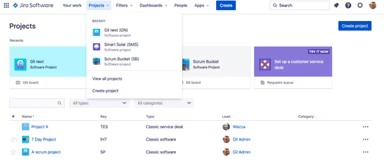
Jira Software is a cloud-based project management tool tailored for agile teams. It facilitates collaboration, planning, and tracking of important projects, ensuring efficient software development and high-quality outcomes. This platform allows development teams to oversee their tasks from initial concept to final launch, making certain that everyone involved is on the same page regarding project objectives and deadlines.
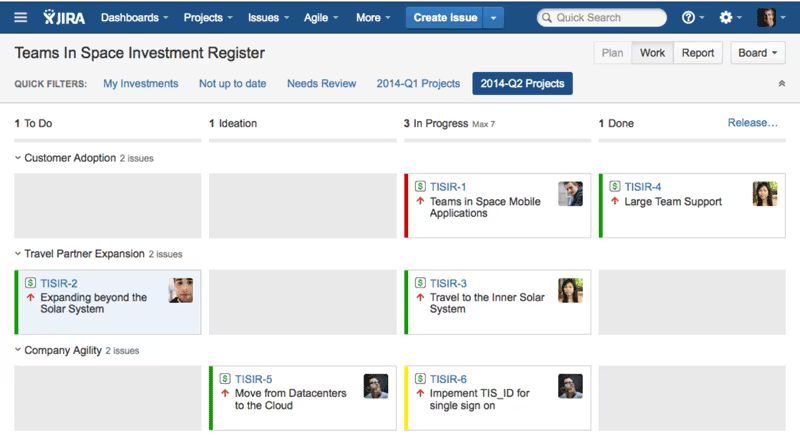
Moreover, the software features a project board with an easy-to-use drag-and-drop interface, which simplifies the management of all project elements. This progress tracking tool also enables the creation of user stories, the resolution of issues, sprint planning, and task assignment among team members.
What Is Jira Software Best For?
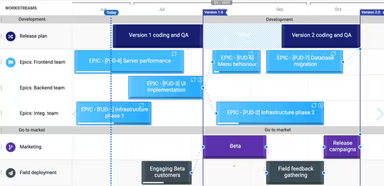
Jira project management software is well-regarded for its robust agile reporting capabilities. It provides an array of reports for project managers that offer valuable insights into team performance and project advancement. Features such as customizable workflows, velocity charts, sprint reports, and more assist organizations in monitoring their team's progress and making informed decisions based on data.
How Much Does Jira Cost?
The pricing for Jira varies according to your organization's size. The vendor presents the following flexible pricing options:
Free – $0/user/month
Standard – $7.53/user/month
Premium – $13.53/user/month
Enterprise – Custom pricing
Data Center – $44,000/year for a minimum of 500 users
Obtain a customized Jira pricing quote tailored to your organization's unique requirements.
Please note: The pricing may change over time.
Jira Software Integrations
Jira connects seamlessly with various third-party applications, including:
Slack
Figma
Microsoft Teams
GitHub
Amazon
How Does Jira Software Work?
The following steps outline how to navigate the dashboard and utilize the features of the software:
Log in to Jira using your credentials.
Use the drag-and-drop interface on the project board to manage project details.
Create user stories and assign tasks to resolve issues.
Plan sprints efficiently to ensure smooth project execution.
Distribute tasks among team members for effective workload management.
Leverage the reporting features for tracking progress.
Collaborate with team members and stakeholders within the platform.
Customize your dashboard and settings according to your project management needs.
You can also arrange a free Jira demo to explore more about the platform.
Who Is Jira Software For?
Jira is a highly adaptable software solution suitable for organizations of any size. It is utilized by various teams operating in sectors such as:
Information technology
Architecture
Manufacturing and Retail
E-commerce
Government
Is Jira Software Right For You?
If you are in search of a reliable tool for task management and project oversight that can navigate the complexities of your agile team, then Jira Software may be an excellent choice. It is trusted by over 250,000 companies globally, including notable names like Twitter, Spotify, BlackRock, ANZ Bank, AppDynamics, and Arizona State University.
The software also collaborates with numerous companies to enhance its functionality. It includes advanced security features such as customizable permissions, IP allow listing, SAML SSO, and SCIM. Additionally, it is designed to scale effortlessly alongside your team, regardless of its size.
If you have further questions after reviewing this information about Jira software, feel free to reach out to our customer support team at info@softwareseekers.com. They are ready to assist you with any inquiries you may have regarding the software to help you make an informed choice.