

Kanbanize Software
Transform your project management with Kanbanize. Streamline workflows and enhance team productivity with its user-friendly interface and powerful features.
Are you prepared to transform the way you manage projects? Kanbanize software enhances workflow efficiency and elevates your team's productivity. With its intuitive design and extensive capabilities, it stands out as a perfect solution for agile project management.
What Is Kanbanize Software?
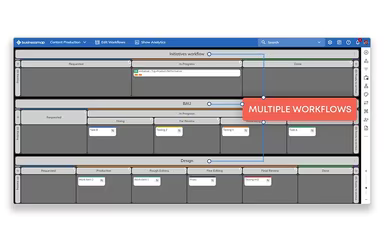
Kanbanize is an agile tool designed for managing projects and portfolios, enhancing team collaboration, and streamlining workflows. It offers comprehensive visibility into projects and portfolios through interconnected Kanban boards, detailed dashboards, and robust reporting features.
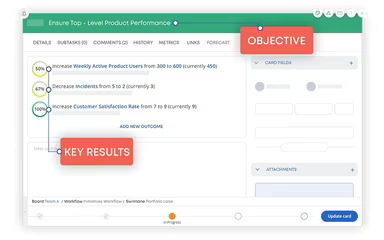
This software aids teams in establishing objectives and key results (OKRs) to improve delivery using lean metrics. Managers can monitor business goals, risks, and key performance indicators through user-friendly management dashboards.
What Is Kanbanize Software Best For?
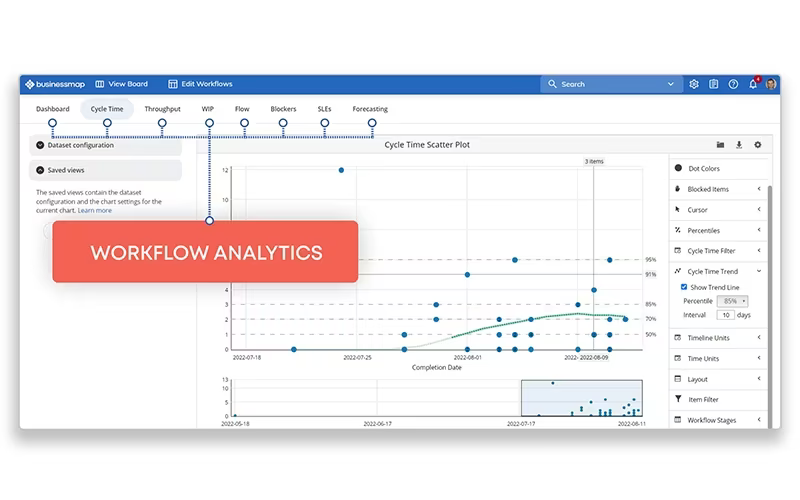
Known for its distinctive visualization capabilities, Kanbanize provides highly adaptable Kanban boards that deliver a transparent visual overview of tasks and workflows. This method enhances comprehension of project progress, identifies bottlenecks, and assesses team capacity. Moreover, its advanced analytics tool supplies real-time insights that can influence strategic decisions.
Kanbanize Pricing
The monthly fee for Kanbanize starts at $209 for a package that includes 15 user licenses and 10 business rules. If billed annually, the cost begins at $174 for the same setup. Keep in mind that prices may rise with additional seats and rules. Users also have the option to include single sign-on and two-factor authentication (2FA) for an extra fee.
Disclaimer: Prices are subject to change.
Kanbanize Software Integrations
This project management application seamlessly connects with various types of software, including business intelligence tools, cloud storage solutions, and development platforms. Kanbanize integrates with numerous third-party applications, such as:
Trello
Power BI
Google Data Studio
Box
GitHub
GitLab
Dropbox
Google Drive
Cyclr
Zapier
How Does Kanbanize Software Work?
To begin using the Kanbanize project management tool, follow these straightforward steps:
Log in and navigate to your workspace to oversee projects and tasks.
Select the "Create New Board" button to establish your initial Kanban board. Choose a name that aligns with your project or team.
Customize your Kanban board according to your requirements. Introduce columns that represent workflow stages like 'To Do,' 'In Progress,' and 'Done.' You may also incorporate swimlanes to further organize your tasks.
Add cards to the board representing individual tasks or work items. Assign these cards to team members, set deadlines, and include any pertinent details or attachments.
As work advances, shift cards across the board from one column to another to reflect their current status.
Utilize built-in communication features for collaboration with team members.
Track essential metrics such as cycle time and lead time to gain insights into your team's performance.
Consider watching a Kanbanize demo to explore the software's various features in depth.
Who Is Kanbanize Software For?
The Kanbanize management software is suitable for a wide range of users from small teams to large enterprises. Various industries that can leverage this software include:
IT
Software development
Engineering
Manufacturing
Aerospace
Pharmaceuticals
Banking and financial services
Architecture and construction
Additionally, Kanbanize offers specific solutions tailored for agile project management and engineering needs.
Is Kanbanize Software Right For You?
With a focus on security, scalability, and user-friendly add-ons, Kanbanize presents itself as a compelling choice for businesses aiming to enhance tracking and collaboration across multiple projects. The software is designed to improve delivery workflows for ongoing business development.
We suggest checking out Kanbanize reviews to see feedback from current users regarding their experiences with the software. Alternatively, reach out to Software Finder at info@softwareseekers.com for further information.