logo

Lucidspark

Learn how Lucidspark can enhance your team's brainstorming activities with its user-friendly and adaptable functionalities. This collaboration tool provides a p...

0.00 | 0 Reviews

Learn how Lucidspark can enhance your team's brainstorming activities with its user-friendly and adaptable functionalities. This collaboration tool provides a p...

Product Overview

Learn how Lucidspark can enhance your team's brainstorming activities with its user-friendly and adaptable functionalities. This collaboration tool provides a powerful platform designed to nurture ideas, promoting a more flexible and fluid creative process within your team. Dive into the features of Lucidspark to elevate your organization's brainstorming efforts.
Product Snapshot

Product Details

What Is Lucidspark?

Lucidspark is an online whiteboard tool that forms part of Lucid's suite for visual collaboration. This software empowers teams to visualize, share, and implement their ideas effectively. Crafted to enhance the creative workflow, it provides an engaging, user-friendly, and collaborative space where teams can brainstorm and strategize. By combining diagramming features with a virtual whiteboard, teams can effortlessly create mind maps and flowcharts.

What Is Lucidspark Best For?

Lucidspark excels at nurturing creativity and facilitating brainstorming sessions. It enables team members to share their insights in real-time, no matter where they are located. The intelligent decision-making tools help teams prioritize and assess ideas with precision. With its capability to capture and disseminate ideas on a digital canvas, it encourages creativity and supports collaborative problem-solving.

Lucidspark Pricing

The pricing for Lucidspark varies based on the chosen subscription plan. Here are the available options:

  • Free – $0.00

  • Individual – $9.00

  • Team – $10.00/user

  • Enterprise - Custom Price

Note: Pricing is subject to change.

Lucidspark Integrations

Users can enhance their visual collaboration experience through various integrations available in the Lucid software marketplace. Some notable third-party integrations include:

  • Google Workspace

  • Microsoft Teams

  • Confluence

  • Slack

  • Figma

  • Asana

  • Jira

  • Trello

How Does Lucidspark Work?

To get started with Lucidspark, follow these simple steps:

  1. Log into your account using your credentials to access your dashboard displaying your boards.

  2. Select 'Create' to initiate a new board for brainstorming.

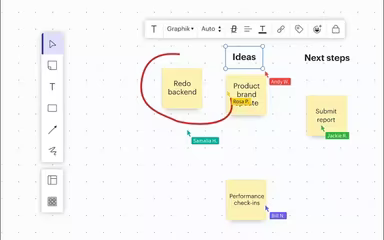
  3. Utilize the toolbar on the left side to insert text, shapes, lines, or sticky notes.

  4. Invite others to collaborate by clicking the 'Share' button.

  5. Engage in real-time collaboration, adding comments and reacting to ideas.

  6. Save your progress and return to the dashboard once completed.

You can also watch a demo of Lucidspark to gain a deeper understanding of this virtual whiteboard software.

Who Is Lucidspark For?

This platform is designed for organizations of all sizes—from small startups seeking a way to visualize their ideas to large enterprises that require effective brainstorming and organized collective thinking. It serves various industries including:

  • Information technology

  • Education

  • Marketing

  • Healthcare

  • Finance

  • Media

  • Retail

Is Lucidspark Right For You?

If your organization thrives on innovation, creativity, and teamwork, then Lucidspark might be an ideal solution for you. As part of the Lucid visual collaboration suite, its features can be expanded upon. You can implement your ideas through workflows and process documents integrated with Lucidchart, another product from the same vendor.

The platform also adheres to industry-standard protocols and employs encryption to safeguard the privacy and integrity of your data. Additionally, it has earned multiple accolades for its product quality, business practices, and workplace culture.

We recommend checking out reviews of Lucidspark to see how current users are benefiting from it. For further inquiries or information, feel free to reach out to our customer support team at info@softwareseekers.com.

Project Management Software Features

dashboard
free plan
reporting
scheduler
dashboards
free trial
mobile app
purchasing
ai features
file sharing
integrations
telemedicine
collaboration
mobile access
time tracking
bid management
patient portal
budgeting tools
e prescriptions
email marketing
lead generation
marketing tools
quality control
rent collection
task management
asset management
automation tools
custom workflows
document sharing
easy integration
expense tracking
lab integrations
lease management
maintenance logs
project tracking
shared calenders
budget management
claims management
data importexport
project templates
safety management
tenant management
time zone support
content management
customizable forms
data visualization
equipment tracking
project management
project scheduling
shop floor control
team communication
alertsnotifications
campaign management
communication tools
contract management
document management
employee engagement
employee management
employee onboarding
facility management
incident management
production planning
property accounting
reporting analytics
resource allocation
workforce analytics
financial management
inventory management
maintenance requests
patient demographics
portfolio and assets
real time monitoring
bill of materials bom
billing and invoicing
business intelligence
customer segmentation
equipment maintenance
inspection management
partner data exchange
product health scores
scalable architecture
work order management
attendee communication
customizable workflows
facilities maintenance
performance management
benefits administration
change order management
compensation management
registration management
reporting and analytics
social media management
supply chain management
workflows and approvals
business intelligence bi
communication and access
documents and compliance
manufacturing management
subcontractor management
training and development
integrated team calendars
stakeholder collaboration
access controlspermissions
human resources management
maintenance and operations
attendance and time tracking
employee self service portal
integration with erp systems
product lifecycle management
centralised product portfolio
venue and resource management
agenda and schedule management
compliance and risk management
human resources management hrm
sales and marketing automation
speaker and content management
audience interaction technology
data driven product performance
employee information management
on site and virtual event tools
project planning and scheduling
tenant and lease administration
appointment managementscheduling
product lifecycle management plm
integration with financial systems
production planning and scheduling
recruitment and applicant tracking
financial management and accounting
customer relationship management crm

Pros

  • Provides an infinite canvas feature
  • Users can deploy freehand drawing and sticky notes to collaborate visually
  • Version control is available
  • Targets agile and strategic planning

Cons

  • New users may find it challenging to use the software
  • Reliable internet connection required for seamless collaboration

Price

Professional

$0

Get Free Guidance from Our Solution Experts.

Ratings

0.00 | 0 reviews

Ratings Distribution

Positive

0%

Neutral

0%

Negative

0%

User Reviews

No reviews yet

Be the first to share your experience with Lucidspark.

Frequently Asked Questions

Find answers to the most common queries about our software recommendation service.

The pricing for Lucidspark depends on the subscription plan chosen. The following are the four pricing plans: Free ($0.00), Individual ($7.95), Team ($9.00/user), and Enterprise (Custom pricing).

Yes, it is compatible with Android and iOS devices.

Yes, API access is available.

Support options include chat, phone, email, FAQs, and a knowledge base.

It supports English, German, Spanish, Dutch, French, Italian, Japanese, Portuguese, and Russian languages.

Typical users of Lucidspark software include healthcare, finance, education, information technology, retail, marketing, and media industries.

It can integrate with several third-party solutions, including Google Workspace, Microsoft Teams, Confluence, Slack, Figma, Asana, Jira, and Trello.