

logo

Maptician

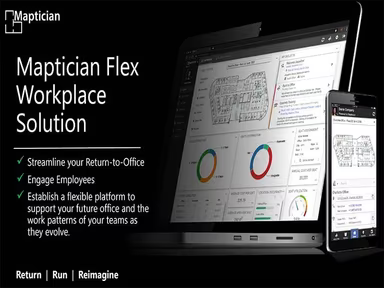
Maptician is a cutting-edge tool designed for the management of hybrid work environments. It provides dynamic floor plans alongside workspace analytics to enhan...

0.00 | 0 Reviews

Maptician is a cutting-edge tool designed for the management of hybrid work environments. It provides dynamic floor plans alongside workspace analytics to enhan...

Product Overview

Maptician is a cutting-edge tool designed for the management of hybrid work environments. It provides dynamic floor plans alongside workspace analytics to enhance the efficiency of office layouts. Discover the potential of Maptician's Scenario Planner and design a workspace that your team will appreciate.
Product Snapshot

Product Details

What Is Maptician?

Overview

Maptician is a cloud-driven platform aimed at ensuring the success of hybrid workplaces. It delivers a smooth and straightforward, top-tier hybrid office experience. This software provides an all-encompassing solution for managing and optimizing office environments, allowing organizations to respond effectively to the evolving demands of contemporary workspaces. This review of Maptician offers a thorough examination of its features, pricing, and added advantages.

What Is Maptician Best For?

Maptician is recognized for its holistic approach to overseeing hybrid workplaces. It includes a scenario planning tool that, when combined with the map editor and assignments manager, creates a robust platform for evaluating future possibilities. This empowers organizations to swiftly test new seating arrangements, furniture configurations, schedules, and more. Such flexibility and adaptability distinguish Maptician from its rivals.

Maptician Pricing

The software features a single pricing model that begins at $3 per user per month. You can request a personalized quote for Maptician costs.

Note: Pricing is subject to change.

Maptician Integrations

This software seamlessly integrates with Microsoft Azure Active.

How Does Maptician Work?

To get started with the software, follow these steps:

  1. Log into the Maptician dashboard using your credentials.

  2. Explore the dashboard, which offers an overview of your workspace.

  3. Access interactive floor plans to familiarize yourself with the office layout.

  4. Reserve a desk or schedule a conference room directly from the floor plan.

  5. Manage visitors through the tech-enabled visitor management feature.

  6. Examine workspace utilization via workspace analytics.

  7. Prepare for future scenarios using the scenario planner, map editor, and assignments manager.

  8. Connect with other services for Single Sign-On (SSO), calendar synchronization, and additional features.

You can also watch a complimentary demo of Maptician to discover more about its functionalities.

Who Is Maptician For?

Maptician serves as an ideal solution for businesses of all sizes aiming to shift towards a hybrid workspace model while effectively managing their office spaces. The software is tailored to meet the needs of organizations ranging from small boutiques to large Fortune-ranked companies.

The software primarily supports these sectors:

  • Legal

  • Financial services

  • Corporate

Is Maptician Right For You?

If you are in search of a robust solution to manage your hybrid workplace, Maptician could be exactly what you need!

This software boasts strong security measures to safeguard your data and maintain privacy. Additionally, it is highly scalable, making it suitable for organizations of various sizes. Whether you are a budding startup or an established corporation, Maptician can adjust to your requirements.

If you remain uncertain about whether Maptician fits your needs, reach out to our customer support team at info@softwareseekers.com, who will assist you in making an informed decision.

Project Management Software Features

dashboard
free plan
reporting
scheduler
dashboards
free trial
mobile app
purchasing
ai features
file sharing
integrations
telemedicine
collaboration
mobile access
time tracking
bid management
patient portal
budgeting tools
e prescriptions
email marketing
lead generation
marketing tools
quality control
rent collection
task management
asset management
automation tools
custom workflows
document sharing
easy integration
expense tracking
lab integrations
lease management
maintenance logs
project tracking
shared calenders
budget management
claims management
data importexport
project templates
safety management
tenant management
time zone support
content management
customizable forms
data visualization
equipment tracking
project management
project scheduling
shop floor control
team communication
alertsnotifications
campaign management
communication tools
contract management
document management
employee engagement
employee management
employee onboarding
facility management
incident management
production planning
property accounting
reporting analytics
resource allocation
workforce analytics
financial management
inventory management
maintenance requests
patient demographics
portfolio and assets
real time monitoring
bill of materials bom
billing and invoicing
business intelligence
customer segmentation
equipment maintenance
inspection management
partner data exchange
product health scores
scalable architecture
work order management
attendee communication
customizable workflows
facilities maintenance
performance management
benefits administration
change order management
compensation management
registration management
reporting and analytics
social media management
supply chain management
workflows and approvals
business intelligence bi
communication and access
documents and compliance
manufacturing management
subcontractor management
training and development
integrated team calendars
stakeholder collaboration
access controlspermissions
human resources management
maintenance and operations
attendance and time tracking
employee self service portal
integration with erp systems
product lifecycle management
centralised product portfolio
venue and resource management
agenda and schedule management
compliance and risk management
human resources management hrm
sales and marketing automation
speaker and content management
audience interaction technology
data driven product performance
employee information management
on site and virtual event tools
project planning and scheduling
tenant and lease administration
appointment managementscheduling
product lifecycle management plm
integration with financial systems
production planning and scheduling
recruitment and applicant tracking
financial management and accounting
customer relationship management crm

Pros

  • Comprehensive hybrid workplace solution
  • Interactive and editable floor plans
  • Tech-enabled visitor management
  • Detailed workspace analytics solution

Cons

  • Requires initial setup time
  • Might have a learning curve
  • Customer support response time may vary

Price

Professional

$3

Get Free Guidance from Our Solution Experts.

Ratings

0.00 | 0 reviews

Ratings Distribution

Positive

0%

Neutral

0%

Negative

0%

User Reviews

No reviews yet

Be the first to share your experience with Maptician.

Frequently Asked Questions

Find answers to the most common queries about our software recommendation service.

Maptician supports the English language.

The software has integration capabilities with Microsoft Azure Active.

The software supports mobile devices.

The software provides a uniform pricing structure at $3 per user per month. You can inquire for a personalized Maptician price plan.

Maptician is an ideal solution for financial services, legal, and corporate sectors transitioning to a hybrid workspace model.

Yes, Maptician has an API available for use.

Maptician support team provides support through email/help desk, a knowledge base, and telephonic assistance.

Maptician provides detailed workspace analytics that offers insights into space utilization. This helps organizations optimize their workspace usage and improve employee satisfaction.

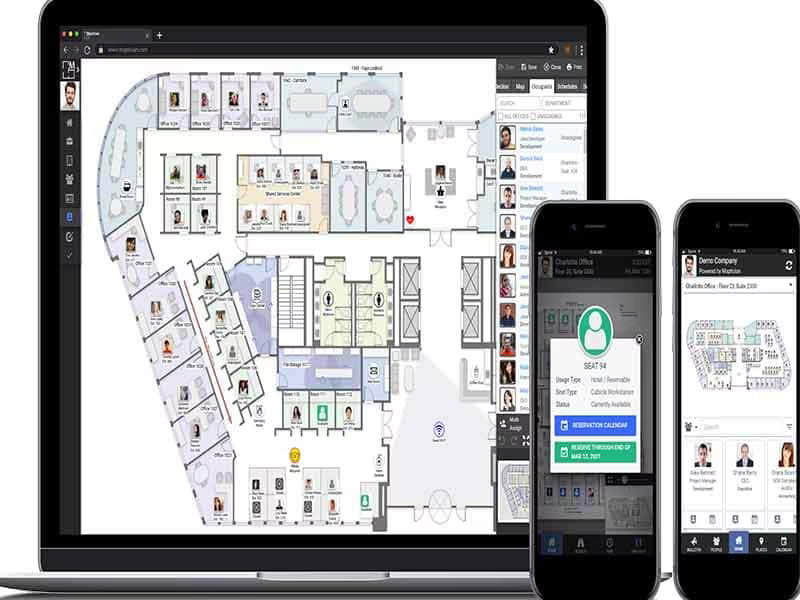
Maptician offers interactive floor plans (maps) that provide a visual representation of the office layout. It also integrates with Azure Active Directory, allowing for seamless user management and authentication.

Yes, Maptician is a cloud-based software and can be accessed from any device with an internet connection, including Windows PCs. You can use your Windows keyboard to navigate and utilize the features of Maptician.

If you accidentally utilize resources on Maptician’s interactive floor plans (maps), you can simply navigate back or undo the action using the available options in the software. If you need further assistance, you can reach out to Maptician’s support team if your Maptician's maps accidentally start to glitch.