

Microsoft Project
Transform your project management with Microsoft Project, offering powerful scheduling and resource planning for structured, multi-phase workflows.
Key Insights
Derived from customer feedback
Microsoft Project serves as a robust project management solution utilized by managers and team leaders in various sectors, including IT, construction, engineering, and professional services. Users frequently commend its powerful scheduling features, particularly the Gantt charts and resource planning functionalities. Nonetheless, several users note that the initial setup can be quite intricate for smaller teams, often necessitating some training.
Our Assessment
Microsoft Project stands out as a dependable choice for managing structured, multi-phase projects. It is particularly well-suited for mid-sized to large organizations that require effective coordination, disciplined scheduling, and clear resource visibility within complex workflows. Although the pricing may be steep for smaller teams, it provides significant long-term value. This tool is ideal for those seeking scalable project management rather than just basic task handling.
What Is Microsoft Project?
Microsoft Project is an all-encompassing project management solution tailored to assist project managers and teams of varying sizes in effectively planning, managing, and monitoring projects. It is offered as both a cloud-based service (Project for the web/Planner) and a desktop application (Standard/Professional). The cloud version integrates seamlessly within the wider Microsoft Planner ecosystem, providing teams with tools for tracking, scheduling, and collaboration directly through their web browser. In contrast, the desktop application delivers a robust environment ideal for intricate and offline project planning.
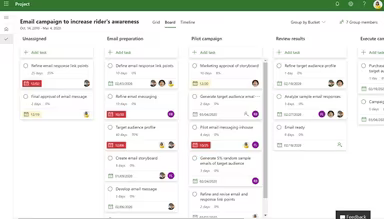
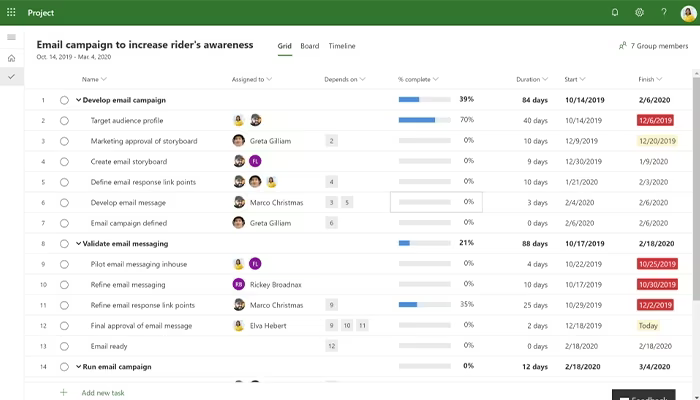
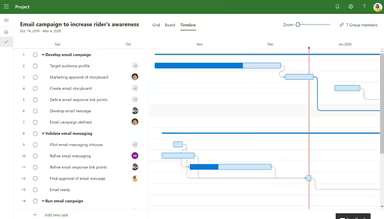
In addition to its essential project management functions, the platform includes features like Gantt charts for visualizing timelines, Kanban boards for managing task flows, and customizable dashboards for a quick overview of progress.
What Is Microsoft Project Best For?
A key highlight of this tool is its advanced scheduling engine, which enables teams to create fully dependent project schedules. Consequently, if one task experiences a delay, it automatically affects the entire project timeline. This capability allows project managers to foresee downstream impacts before they escalate into significant issues.
How Much Does Microsoft Project Cost?
The entry price for this straightforward project management tool starts at $10.00/user/month for Planner Plan 1. A 30-day free trial is available across all subscription options. The cost of a Microsoft Project license can be adjusted based on user count and subscription type. The pricing plans for MS Project include:
Planner And Project Plan 3 - $30.00/user/month
Planner And Project Plan 5 - $30.00/user/month
For those who prefer a one-time purchase option, Microsoft Project can be acquired as a perpetual desktop license:
Project Standard 2024 - $719.99
Project Professional 2024 - $1,409.99
Project Server – Custom Pricing
The following price range serves as an estimate for budgeting purposes only:
Microsoft 365 Subscription Dependency: $6–$22/user/month - Planner is frequently included within broader Microsoft 365 plans, which may be necessary for full functionality and access.
Advanced Project Features (Premium Plans): $10–$30/user/month - This includes timeline (Gantt), task dependencies, resource management, and portfolio-level planning.
Implementation And Admin Setup: $200–$2,000 - This covers initial configuration, team structuring, permissions setup, and workflow alignment within the Microsoft ecosystem.
Power Platform And Automation: $10–$40/user/month - These are costs linked to Power Automate, Power Apps, or advanced workflow automation and integrations.
Reach out to us to obtain a customized Microsoft Project software price that meets your requirements.
The pricing is subject to change.
Microsoft Project Integrations
This platform integrates effortlessly with other applications included in the Microsoft 365 suite. MS Project works alongside Outlook, SharePoint, Microsoft Excel, Microsoft PowerPoint, Planner, OneNote, and Microsoft Teams to create a cohesive experience.
Users can access these products through their Microsoft account, simplifying the project planning process significantly. The MS Project server enables you to manage tasks, create schedules, and review your project plan—all from one central location.
How Does Microsoft Project Work?
If you want to begin using the Microsoft Project management tool after logging in, follow these steps to manage and delegate work among your team:
Access the main dashboard for a centralized overview of all active projects, timelines, and recent updates.
Create a new project plan by using templates or starting from scratch to outline project scope and structure.
Define project tasks by breaking down work into phases, milestones, and specific actionable items.
Assign tasks to team members and establish ownership to ensure clear accountability throughout the project.
Set timelines and dependencies to outline task sequences and effectively manage scheduling conflicts.
Monitor progress using visual tools such as Gantt charts, boards, and dashboards to track completion status.
Allocate resources and budgets to ensure proper distribution of workload and financial oversight across tasks.
You can watch a demo of Microsoft Project software to explore its functionalities further.
Who Is Microsoft Project For?
The software is predominantly utilized in sectors such as construction, engineering, IT, marketing, and product development. Its project management tools cater to various roles including:
Project managers
Project teams
System administrators
Stakeholders
Individual contributors
Microsoft Project Use Cases
An analysis of MS Project’s features alongside typical user workflows reveals key scenarios where this software excels for project-focused teams and organizations:
Enterprise PMOs Managing Multi-Department Project Portfolios: Large organizations frequently utilize Microsoft Project to oversee numerous concurrent initiatives across various departments. Typically, project managers depend on it to maintain visibility over interrelated projects while tracking dependencies and identifying scheduling conflicts early on. This provides leadership with a unified view of project health without needing constant status updates from each team.
Construction And Engineering Teams Handling Complex Scheduling: In construction and engineering settings, project managers often adopt Microsoft Project to handle meticulously structured schedules with interdependent tasks. It effectively outlines long-term project lifecycles where delays in one phase can significantly impact subsequent activities. Teams use it to coordinate contractor schedules and resource allocation across multiple job sites while maintaining clarity on the overall project roadmap.
IT Teams Delivering Software Development And Infrastructure Projects: IT teams typically leverage MS Project to manage software development cycles as well as infrastructure rollouts and system upgrades. The platform proves useful in breaking technical work into organized phases while assigning responsibilities and tracking progress across agile or hybrid workflows. It allows engineering, QA, and operations teams visibility into their work's position within the broader timeline without frequent check-ins.
Manufacturing And Operations Teams Coordinating Production Cycles: Teams focused on manufacturing and operations rely on Microsoft Project for planning production schedules while managing supply chain dependencies and aligning operational workflows. This tool aids in connecting procurement with production and delivery within a single schedule. It holds particular value in environments where delays at any operational stage could affect overall output commitments.
Is Microsoft Project Right For You?
The MS Project tool is widely recognized as one of the premier project management software options due to its ability to handle complex projects while managing resources effectively and keeping stakeholders informed. It empowers users to streamline project planning processes while enhancing collaboration and providing real-time insights—all within a secure and scalable framework. This makes it an excellent choice for businesses ranging from small teams to large enterprises across diverse industries.
Beneath Microsoft's trusted infrastructure umbrella, it complies with ISO 27001, SOC 1, SOC 2, and GDPR standards. By supporting companies like Ontic, the platform ensures precision and control in environments where mistakes can be costly.
If you remain uncertain about whether purchasing Microsoft Project is right for you, please contact us at info@softwareseekers.com so we can assist you in making an informed decision about your project management needs.