

Miro Software
Transform remote teamwork with Miro Software's agile interface and advanced features. Experience visual collaboration and unlock your team's full potential.
Are you in search of a flexible tool for collaboration? Your search ends with Miro Software. Boasting a dynamic interface and a host of sophisticated features, Miro transforms the way teams collaborate remotely. Discover the advantages of visual collaboration and tap into the complete capabilities of your team.
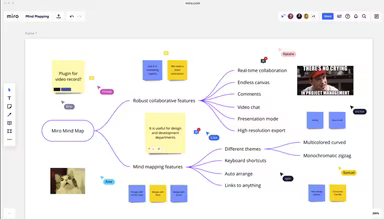
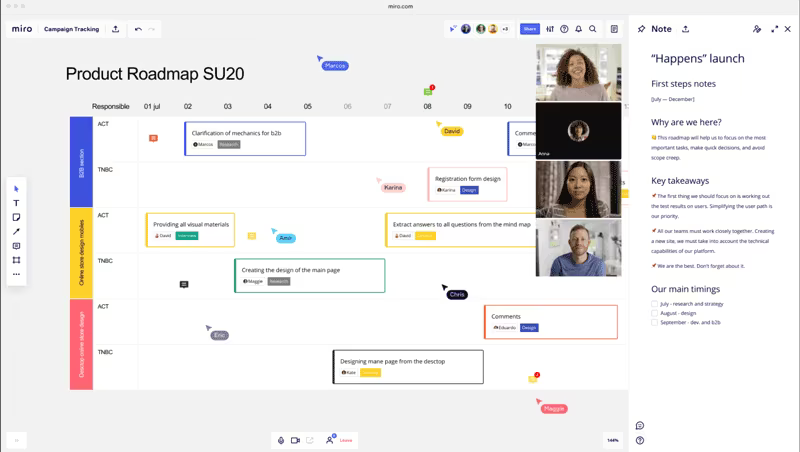
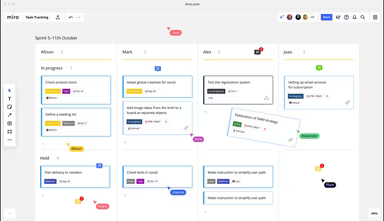
What Is Miro?
Miro is a cloud-driven project management tool designed specifically for small and medium-sized enterprises. This platform includes features that track customer journeys and carefully outline project development using wireframing and various collaborative tools. Thus, Miro stands out as a vital resource for effective project management.
What Is Miro Best For?
A standout aspect of Miro is its digital whiteboard, which serves as an exceptional tool for collaboration and idea sharing. This functionality allows teams to easily exchange thoughts and concepts, engage in fruitful brainstorming sessions, conduct thorough research, and carefully plan storyboards. Thanks to its user-friendly interface, the digital whiteboard facilitates seamless teamwork, promoting creativity, innovation, and effective project oversight.
Miro Pricing
Miro provides a free version along with three distinct plans: Starter, Business, and Enterprise.
Free: $0/month
Starter: $10/month
Business: $20/month
Enterprise: Custom pricing available
Note: Prices may vary.
Miro Software Integrations
The Miro platform can connect with over 130 different applications. Some notable third-party integrations include:
Webex
Zoom
Microsoft Teams
Slack
Atlassian
Google Workspace (including Google Docs, Calendar, meetings, etc.)
How Does Miro Software Work?
To get started with Miro's project management platform, follow these steps:
Log in using your credentials to reach the Miro dashboard.
Create a new board by clicking on the "Create a new board" button. This board acts as a collaborative space for your team.
Name your board and choose a template if you prefer starting with a predefined layout. Templates can expedite your setup for common scenarios.
Once the board is set up, begin adding content. Miro provides numerous tools for visual collaboration such as sticky notes, images, diagrams, and more. Check the toolbar on the left side of the board for access to these features.
Invite team members to collaborate by clicking the "Invite" button and entering their email addresses. They will receive an invitation to join your board via email.
Utilize real-time collaboration options like commenting, tagging teammates, Miro smart meetings, and @mentions to notify specific individuals.
To link your preferred tools, click the "Connect" button and follow the prompts for integration setup.
Explore Miro Academy for educational resources, visit the Help Center for support, and engage with other users in the Miro Community Forum.
Watch a demo of Miro Software to discover more about its various features.
Who Is Miro Software For?
Miro software is suitable for organizations of all sizes across diverse sectors. Whether small startups or large corporations, many can take advantage of what Miro has to offer. It is utilized in several fields including:
Information Technology
Marketing and Advertising
Design and Creative Agencies
Project Management
Consulting
Education
Research
What's New
The "What's New" program keeps users updated on the latest features and enhancements within the platform. This allows businesses to stay informed about new functionalities that can enhance their collaborative experience continuously.
Is Miro Software Right For You?
Miro is recognized as a leading visual collaboration tool with a remarkable user base exceeding 25 million globally. It serves as an exceptional platform that promotes seamless collaboration among cross-functional teams and encourages the sharing and presentation of innovative ideas.
Check out Miro reviews to learn what current users think about the software. For further inquiries, feel free to reach out to us at info@softwareseekers.com.