
Monitask Software
Boost your team's productivity with Monitask! Capture user activity and gain insights into work time and efficiency for enhanced performance.
The software known as Monitask serves as a powerful solution aimed at optimizing productivity within your organization. It tracks user engagement, offering clear insights into working hours and overall efficiency. Dive into the features of this cutting-edge tool to boost your team's effectiveness.
What Is Monitask Software?
Overview
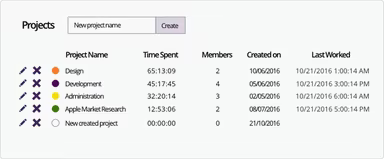
Monitask is an intuitive software solution designed for monitoring employees, helping businesses oversee projects and assess productivity levels. This platform boasts a variety of functionalities, such as time tracking, generating online timesheets, tracking employee productivity, managing clock-in/clock-out boards, monitoring computer usage, overseeing remote employees, and keeping tabs on attendance. Monitask is tailored to support any remote team, regardless of size or industry.
What Is Monitask Software Best For?
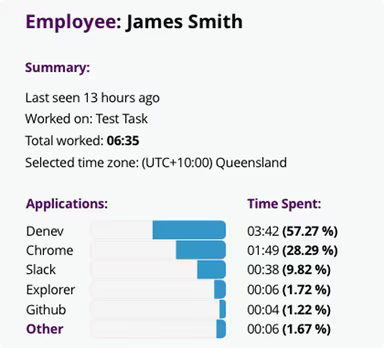
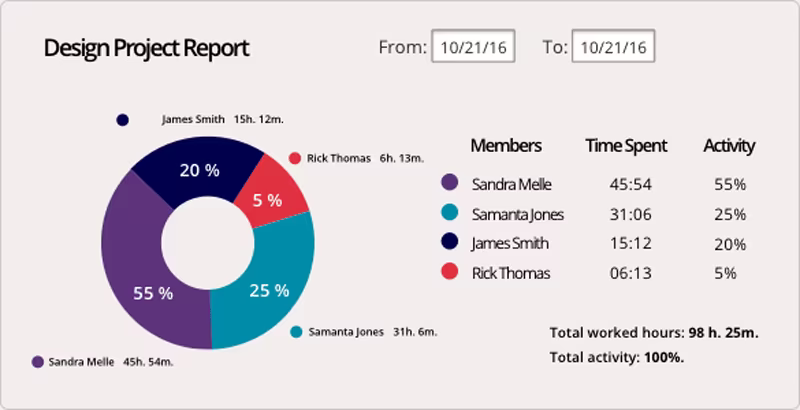
A standout feature of Monitask is its capability to create comprehensive reports detailing employee activity and productivity. Managers can obtain insightful productivity reports that outline essential metrics like time allocated to various projects, total hours worked, screen capture information, and the applications and websites accessed. This level of transparency into employee workflows enhances overall productivity.
Monitask Software Pricing
Monitask offers a free trial along with three pricing plans:
Pro - $5.99/user/month
Business - $8.99/user/month
Enterprise - Custom pricing
Please note that pricing may change.
Monitask Software Integrations
The software supports integration with various third-party applications. Some notable time-tracking integrations include Jira, ClickUp, Basecamp 3, and Remote Team. Additional integrations include:
Myob
QuickBooks Online
Bamboo HR
Accelo
Asana
How Does Monitask Software Work?
If you’re ready to use Monitask's employee-monitoring software, follow these simple steps:
Log in to your Monitask account dashboard using your credentials. This dashboard provides access to all features and allows you to monitor employee activity.
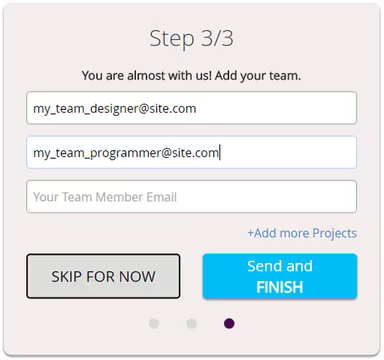
Add team members by entering their names and emails while setting up their profiles. You can adjust permissions and access based on roles.
Your employees will receive an invitation to download and install the Monitask application or extension.
After installation, employees can log in and clock in/out of their shifts directly through the application.
Managers can check real-time activity statuses of online employees via the dashboard.
Employees can tag their clocked-in time with tasks or projects. Managers can generate reports based on these tags.
At the end of each week or month, managers can produce timesheet reports detailing time spent and activities for each employee.
Data analytics can be reviewed to pinpoint bottlenecks, enhance workflows, and establish performance benchmarks.
Consider watching a demo of Monitask to learn more about its capabilities.
Who Is Monitask Software For?
The employee-monitoring and time-tracking capabilities of Monitask make it suitable for businesses of various sizes across multiple industries. It is particularly advantageous for:
Remote software development teams
Creative and marketing agencies
Consulting firms
E-commerce businesses
The education sector
Is Monitask Software Right For You?
If you are seeking efficient solutions for employee monitoring, Monitask project management software is a great fit. It provides secure monitoring while respecting employee privacy. The various customization options enhance data accuracy as well as performance, allowing businesses to make informed choices, set realistic goals, and reduce costs.
This software prioritizes security and confidentiality; it does not log keystrokes or sensitive information. It's ideal for businesses that emphasize transparency, productivity, and adherence to legal and ethical standards.
We suggest checking out reviews on Monitask to see how current users have leveraged its features to boost business productivity. For assistance in making a confident choice, reach out to our customer support team at info@softwareseekers.com.