

PM3 Software
Streamline project governance with PM3, the powerful PPM tool that enhances portfolio visibility and flexible reporting for organizations of all sizes.
Key Insights
Derived from customer feedback
PM3 serves as a project portfolio management (PPM) solution that consolidates governance and reporting functions. It is utilized by PMOs, program managers, and project leaders across a variety of sectors. Users frequently commend its excellent portfolio visibility and adaptable reporting features, although some have observed that not all modules sync seamlessly. Recent enhancements feature an integrated Xero connection to streamline invoicing directly from project costing information.
Our Assessment
This tool is particularly well-suited for organizations in fields such as healthcare, education, and local government that require a systematic, outcome-focused approach to project and portfolio management rather than basic task tracking. While its pricing structure is more favorable for mid-sized to large enterprises, it may not be the most economical choice for smaller teams. In summary, it stands out as an ideal option for organizations emphasizing scalability, control, and comprehensive portfolio visibility.
What Is PM3 Software?
Developed by Best Outcome, PM3 serves as a comprehensive project portfolio management (PPM) solution. It aims to assist organizations in consolidating governance, visibility, and control across various projects and programs. Unlike traditional tools that focus solely on individual project execution, PM3 is centered around portfolio-level oversight, facilitating informed decision-making in complex delivery landscapes.
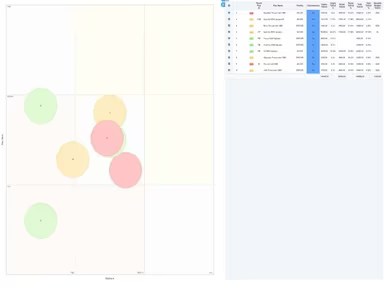
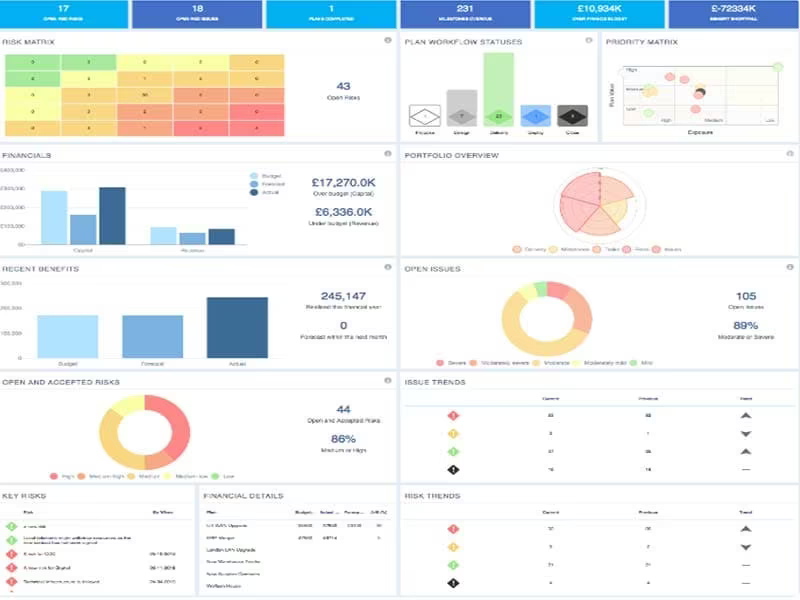
This platform prioritizes integrated portfolio governance, real-time reporting, and customizable workflows, allowing organizations to ensure that project delivery aligns with their strategic goals. Moreover, it merges resource management, time tracking, and financial visibility into one cohesive environment, making it an ideal choice for managing projects at scale.
What Is PM3 Software Best For?
PM3 is particularly adept at meeting the stringent needs of multi-client billing and resource forecasting through its feature PM3Time. By centralizing time entry linked to specific project tasks, it streamlines the process from raw hours to validated financial insights. This level of structural accuracy empowers consulting firms to prevent billing leakage while maintaining real-time awareness of the profitability of each billable workstream.
How Much Does PM3 Software Cost?
The starting price for PM3 is $15 per month. Pricing is primarily based on quotes and may vary according to the specific requirements of users. Free demos are available for those interested in exploring the software.
Alongside the base subscription fees, organizations might encounter additional estimated costs such as:
Implementation And Deployment: Approximately 20 – 50% of the first-year subscription cost
Onboarding And Initial Setup: $1,000 – $15,000+
Data Migration: $2,000 – $20,000+
User Training: $500 – $2,500 per user
Integration Development: $1,000 – $10,000 per integration
User feedback often suggests that PM3's pricing is reasonable for organizations seeking structured project portfolio management capabilities. Many users regard the platform as a worthwhile long-term investment due to its adaptability, scalability, and extensive feature set, although some have noted that complex setups may require longer configuration times.
Request a personalized PM3 pricing quote for your organization today.
Disclaimer: Price references are derived from publicly accessible third-party information and industry benchmarks. Actual expenses may differ.
PM3 Software Integrations
The platform offers integration with various CRM, ERP, and project management tools such as:
Microsoft Teams
Xero Accounting Solution
How Does PM3 Software Work?
Here’s a quick guide on how to get started with PM3 once it has been implemented:
Log in to PM3 to access the main dashboard that displays key portfolio metrics.
Select your role-based view (e.g., project, program, or portfolio) to reach relevant work areas.
Navigate the dashboard to find live status updates, summaries, and high-level reports.
Open the portfolio or program section to see grouped projects along with overall progress tracking.
Dive into individual projects for detailed reviews of timelines, tasks, risks, and dependencies.
Visit governance areas to keep track of issues, approvals, and essential decision logs all in one place.
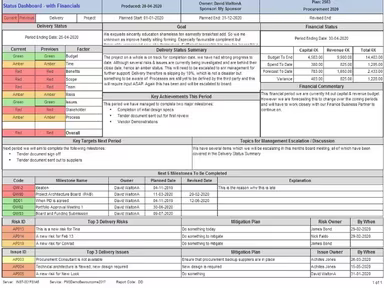
Utilize reporting tools to generate customized views across projects, programs, or portfolios.
Request a PM3 demo to fully explore its capabilities and advanced features.
Who Is PM3 Software For?
A diverse array of industries can benefit from the strengths of PM3 software including:
Hospitality
Consumer products
Healthcare
Financial services
Legal
Transport
PM3 Software Use Cases
Based on our review of user experiences and the current capabilities of PM3, we have identified several scenarios where this platform excels in helping organizations manage complex projects, portfolios, and operational workflows:
Organizations Managing Multiple Concurrent Projects: The platform is well-suited for companies overseeing numerous projects at once across various departments or teams. Its structured approach aids in maintaining visibility into timelines, budgets, and resource allocation without relying on disconnected tools or spreadsheets.
Enterprises Requiring Highly Customizable Workflows: Businesses with specialized operational processes can benefit from the flexibility offered by PM3. User reviews frequently emphasize its adaptability to different project structures and reporting needs—ideal for industries with distinct governance or compliance demands.
Teams Transitioning From Manual Project Tracking: For organizations shifting away from spreadsheets or outdated systems toward a more centralized project management setup, PM3 is an excellent option. Its organized interface and robust reporting features help standardize workflows while improving collaboration among stakeholders.
Professional Services And Consulting Firms: Consulting agencies and service-based businesses can leverage PM3’s project visibility alongside its time-tracking capabilities. Integrations with platforms like Xero also facilitate closer alignment between project execution and financial operations.
Is PM3 Software Right For You?
If your organization seeks enhanced portfolio control along with structured project governance, then PM3 might be an ideal match! It is particularly beneficial for mid-sized to enterprise teams requiring scalable portfolio management solutions, customizable reporting options, and centralized oversight across intricate project environments. Additionally, PM3 holds Cyber Essentials accreditation and adheres to enterprise-grade security standards—including ISO 27001-aligned practices—making it suitable for regulated settings.
The platform is crafted to satisfy common compliance needs through controlled access mechanisms, structured data management practices, and audit-friendly project oversight. Therefore, with its focus on enterprise-grade security combined with flexible configuration options, PM3 can easily adapt to existing organizational processes instead of imposing rigid workflows.
If you still have questions regarding whether PM3 is suitable for your requirements, please reach out to our customer support team at info@softwareseekers.com for assistance in selecting the best option for your needs.