

Project Office
Streamline your project management with Project Office's powerful task organization and Gantt charts, enhancing visibility and coordination for your team.
Project Office streamlines the management of projects by facilitating efficient task organization and resource distribution. While there may be a significant learning curve at the beginning, this software delivers detailed Gantt charts and comprehensive task management functionalities. In summary, Project Office equips teams with powerful tools that improve project visibility and collaboration, proving to be an invaluable resource.
What Is Project Office?
Overview
Project Office is an all-encompassing project management platform designed to facilitate planning, execution, and oversight. Its intuitive interface caters to a diverse range of users, including project leaders, team members, and various stakeholders.
This software empowers business managers and supervisors to customize workdays and business hours according to their needs. Users can set tasks to be completed within specified timeframes or ahead of project deadlines.
What Is Project Office Best For?
A standout feature of Project Office is its robust task management capabilities. Users can create, assign, prioritize tasks, establish deadlines, and monitor progress. This thorough approach to managing tasks helps ensure that everyone stays aligned and that projects are completed on time.
By offering a clear view of tasks and their current statuses, this project management tool supports effective planning and execution — both of which are vital for successful project oversight.
Project Office Pricing
Project Office is available for a one-time fee of $99.99. Click on Get Pricing to obtain a tailored pricing guide for Project Office.
Project Office Integrations
The vendor has not disclosed any third-party software integrations compatible with Project Office.
How Does Project Office Work?
To begin using Project Office, business teams can follow these straightforward steps:
Log in to your Project Office account using your username and password.
Familiarize yourself with the main dashboard and different sections of the software.
Create a new project by clicking the "New Project" button or navigating to the appropriate section. Enter essential details such as project name, description, start date, end date, and other required information.
Add team members by inviting them via email or selecting from existing users within your organization. Assign the necessary roles and permissions.
Break down the project into smaller, manageable tasks.
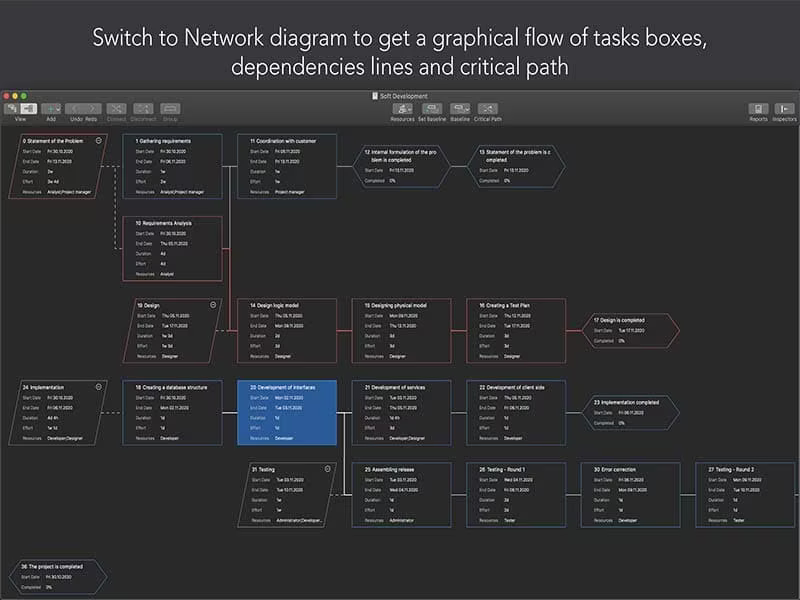
Add task descriptions along with start and end dates, assignees, and any dependencies between tasks.
Establish specific milestones to monitor progress and manage deadlines effectively.
Allocate resources such as team members and equipment while ensuring optimal usage to avoid over-allocation or underutilization.
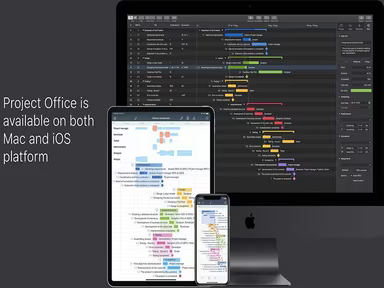
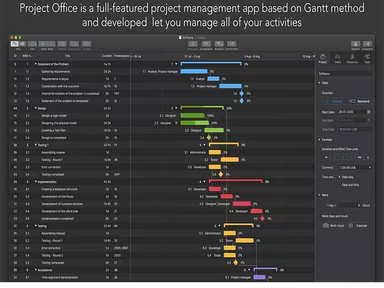
Utilize Gantt chart views to visualize your project's timeline and task dependencies.
Modify task durations and dependencies as necessary to guarantee timely completion of the project.
Regularly review task statuses and reassign resources when needed.
Leverage built-in reporting and analytics tools to assess project performance and identify potential challenges.
Use collaboration features like file sharing and chat to enhance communication among your project team members.
If you need further assistance, reach out to Software Finder support at info@softwareseekers.com. Alternatively, you can schedule a demo to explore the functionalities of Project Office more thoroughly.
Who Is Project Office For?
Project Office is suitable for both individuals and organizations managing projects of various sizes and complexities. This project management software is ideal for professionals in sectors such as:
IT
Marketing
Construction
Event planning
Product development
Is Project Office Right For You?
Project Office delivers a comprehensive and user-friendly solution for managing projects regardless of their scope or complexity. With features like task management, Gantt charts, resource allocation, and more, it supports effective project planning, execution, and monitoring.
The software also offers valuable insights through its reporting and analytics capabilities, empowering managers to make informed decisions that enhance project outcomes. Overall, it represents a powerful tool for streamlining schedules, promoting collaboration, and boosting business productivity.
If you're interested in learning more about this software, we recommend checking out reviews from current users of Project Office to gain insight into their experiences.