

logo

QuickBooks Time Software

QuickBooks Time offers an efficient solution for tracking employee hours and managing schedules, thereby streamlining payroll and invoicing processes. While it...

0.00 | 0 Reviews

QuickBooks Time offers an efficient solution for tracking employee hours and managing schedules, thereby streamlining payroll and invoicing processes. While it...

Product Overview

QuickBooks Time offers an efficient solution for tracking employee hours and managing schedules, thereby streamlining payroll and invoicing processes. While it may not provide extensive customization features, its user-friendly design ensures that users can easily maintain organization and workflow. The software's precision and simplicity render it an essential asset for companies of any scale.
Product Snapshot

Product Details

What is QuickBooks Time Software?

Overview

QuickBooks Time is a robust solution for tracking employee hours and scheduling that helps business owners save both time and resources. With this software, traditional punch clocks or spreadsheets can be replaced, streamlining payroll, invoicing, and job cost management.

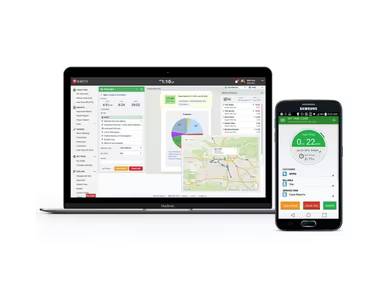
Your team can monitor their progress in real-time from anywhere, whether they are using a smartphone, tablet, desktop, or laptop. This flexibility supports remote work and allows for tracking employee locations through an intuitive mobile application. Employees can work from virtually any location with ease.

What is QuickBooks Time Software Best For?

QuickBooks distinguishes itself from other software by providing access to employee time data through the QuickBooks Time mobile app. It stands out as the only timer that integrates flawlessly with QuickBooks.

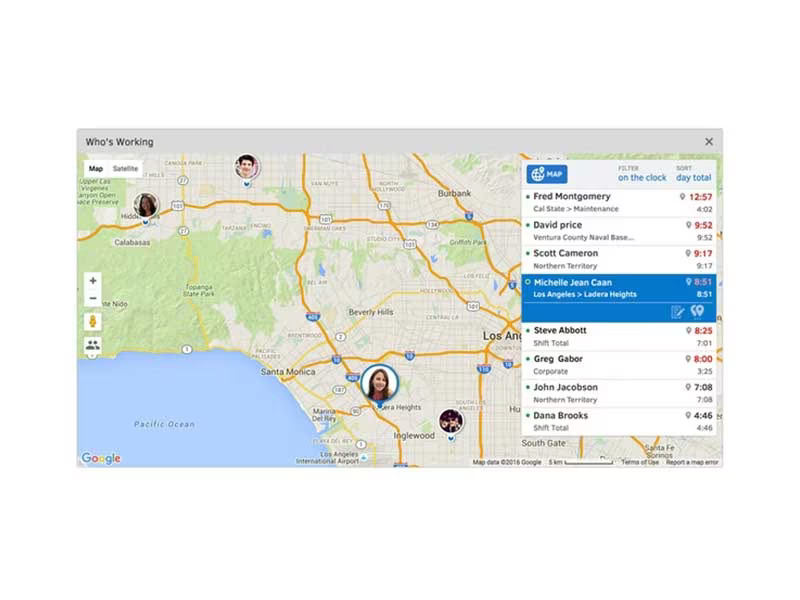
A key feature that sets this application apart from its rivals is its capability to identify which employees are engaged in specific projects and who may not be working at all. The “Who's Working” window allows you to see what tasks your employees are focusing on in real-time. Additionally, GPS location tracking enhances accountability, making it a unique offering in the project management software landscape.

QuickBooks Time Pricing

QuickBooks Time offers four unique pricing plans. Users can choose from Simple Start, Essentials, Plus, and Advanced packages. For detailed insights into these pricing plans, scroll down to the pricing section. You can also select the Get Pricing option for a customized quote.

QuickBooks Time Software Integration

This software integrates seamlessly with various third-party applications, including:

  • PayPal

  • WordPress

  • Mailchimp

  • Acuity Scheduling

  • Wix

How does QuickBooks Time Software Work?

After installation, you can begin using QuickBooks Time by following these steps:

  1. Utilize your existing QuickBooks account or create a new one.

  2. Set up your company by entering essential details such as the company name, address, and contact information.

  3. Add employees to manage their attendance and time effectively.

  4. Create projects or tasks and assign them to specific employees.

  5. Track employee time and expenses by monitoring the duration spent on each task and related costs.

  6. Generate invoices based on the hours worked.

  7. View, export, and print reports to monitor your company's time and expenses.

If you want to experience QuickBooks firsthand, click on Watch Demo, and one of our customer support representatives will contact you within 24 hours to provide a live demonstration of the system.

Who is QuickBooks Time Software For?

This software is tailored for:

  • Businesses of all sizes seeking effective time-tracking and payroll solutions.

  • Companies with remote or mobile workforces needing to track time from various locations.

Is QuickBooks Time Software Right for You?

If you are on the lookout for an intuitive yet powerful time-tracking solution, QuickBooks Time is definitely worth considering. With its extensive features, it empowers you to manage your time and attendance needs efficiently. To gain a deeper insight into the software's capabilities, you might want to watch a demo video or sign up for a free trial to see if it aligns with your requirements.

The pricing structure also reflects its scalability; whether you're a small startup aiming for growth or an established large enterprise, QuickBooks Time has plans that cater to you.

The application adheres to stringent security protocols and complies with legal standards as well as card network regulations. It follows strict compliance guidelines and adheres to Payment Card Industry Data Security Standards (PCI DSS) as well as Payment Application Data Security Standard (PA-DSS) regulations to ensure secure transactions.

Project Management Software Features

dashboard
free plan
reporting
scheduler
dashboards
free trial
mobile app
purchasing
ai features
file sharing
integrations
telemedicine
collaboration
mobile access
time tracking
bid management
patient portal
budgeting tools
e prescriptions
email marketing
lead generation
marketing tools
quality control
rent collection
task management
asset management
automation tools
custom workflows
document sharing
easy integration
expense tracking
lab integrations
lease management
maintenance logs
project tracking
shared calenders
budget management
claims management
data importexport
project templates
safety management
tenant management
time zone support
content management
customizable forms
data visualization
equipment tracking
project management
project scheduling
shop floor control
team communication
alertsnotifications
campaign management
communication tools
contract management
document management
employee engagement
employee management
employee onboarding
facility management
incident management
production planning
property accounting
reporting analytics
resource allocation
workforce analytics
financial management
inventory management
maintenance requests
patient demographics
portfolio and assets
real time monitoring
bill of materials bom
billing and invoicing
business intelligence
customer segmentation
equipment maintenance
inspection management
partner data exchange
product health scores
scalable architecture
work order management
attendee communication
customizable workflows
facilities maintenance
performance management
benefits administration
change order management
compensation management
registration management
reporting and analytics
social media management
supply chain management
workflows and approvals
business intelligence bi
communication and access
documents and compliance
manufacturing management
subcontractor management
training and development
integrated team calendars
stakeholder collaboration
access controlspermissions
human resources management
maintenance and operations
attendance and time tracking
employee self service portal
integration with erp systems
product lifecycle management
centralised product portfolio
venue and resource management
agenda and schedule management
compliance and risk management
human resources management hrm
sales and marketing automation
speaker and content management
audience interaction technology
data driven product performance
employee information management
on site and virtual event tools
project planning and scheduling
tenant and lease administration
appointment managementscheduling
product lifecycle management plm
integration with financial systems
production planning and scheduling
recruitment and applicant tracking
financial management and accounting
customer relationship management crm

Pros

  • Helps you access your accounting data from anywhere with an internet connection
  • Allows direct bank account connections for automatic transactions import, saving time and reducing errors
  • Keeps a track of all financial transactions in a centralized dashboard

Cons

  • Importing data from other software can be challenging and may require additional services
  • Offers limited customization options compared to other accounting software

Price

Professional

$15.00

Get Free Guidance from Our Solution Experts.

Ratings

0.00 | 0 reviews

Ratings Distribution

Positive

0%

Neutral

0%

Negative

0%

User Reviews

No reviews yet

Be the first to share your experience with QuickBooks Time Software.

Frequently Asked Questions

Find answers to the most common queries about our software recommendation service.

QuickBooks Online offers live chat support, query search portal, and a comprehensive knowledge base.

QuickBooks Online caters to businesses of all sizes. It’s specifically used by accountants, account managers, business managers, freelancers, and independent contractors.

QuickBooks Time Software supports multiple languages including English, Italian, Japanese, Korean, Spanish, Portuguese, Arabic, and Thai.

Yes, the QuickBooks Online mobile app works with iPhone, iPad, and Android phones and tablets.

Yes, QuickBooks Online has a mobile app available for iOS and Android devices.

QuickBooks Online offers three pricing plans: Simple Start ($18 per month), Essentials ($27 per month), Plus ($38 per month), and Advanced ($76 per month). QuickBooks Time Software pricing has 70% off offers currently, contact us for a tailored cost.

No, QuickBooks software is not free, but it offers a 30-day free trial. After the trial period ends, users have to pay a monthly subscription fee.