

logo

Redbooth

Redbooth simplifies teamwork and boosts project oversight. Thanks to its intuitive design and regular updates, groups can effectively manage tasks and enhance t...

0.00 | 0 Reviews

Redbooth simplifies teamwork and boosts project oversight. Thanks to its intuitive design and regular updates, groups can effectively manage tasks and enhance t...

Product Overview

Redbooth simplifies teamwork and boosts project oversight. Thanks to its intuitive design and regular updates, groups can effectively manage tasks and enhance their communication.

That said, a few users might face restrictions when using the Chrome extension. Even with this limitation, Redbooth continues to be a powerful tool for efficient project coordination and management.
Product Snapshot

Product Details

What Is Redbooth?

Redbooth is an innovative cloud-based solution for project management and team collaboration, designed to enhance the way teams coordinate their tasks and communicate. With essential features like task management, team messaging, and file sharing, Redbooth facilitates seamless collaboration among team members.

This software is tailored for teams aiming to achieve their best results together. It allows users to handle multiple tasks at once through its adaptable platform. Teams can maintain focus on ongoing projects while quickly launching new ones using pre-designed templates. Organizations worldwide rely on Redbooth to oversee their critical projects.

What Is Redbooth Best For?

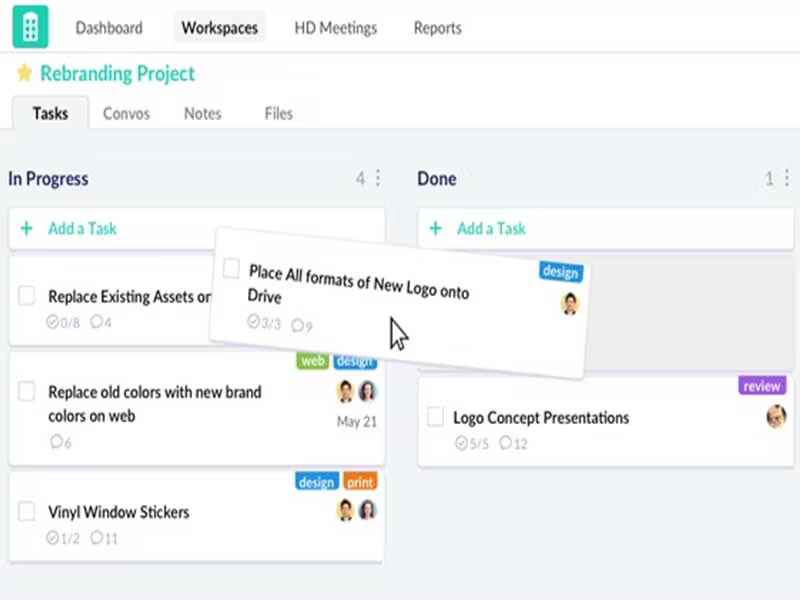
The hallmark of Redbooth lies in its user-friendly interface and versatile tools that assist teams in managing their workflows and enhancing communication. One standout feature is the use of Kanban boards for organizing tasks, which enables straightforward project planning and monitoring on customizable boards. Users can sort, tag, and arrange tasks for improved clarity and efficient task management.

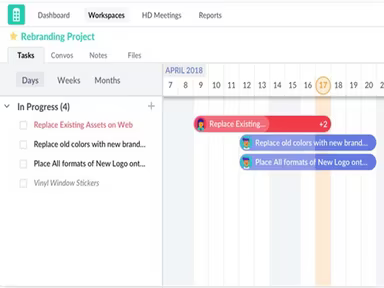
Additionally, it provides comprehensive productivity reports that give insights into task statuses, time spent, and progress tracking across users and workspaces. The software also includes Redbooth’s Timeline View, allowing users to monitor projects using Gantt charts.

Redbooth Pricing

Redbooth offers a variety of pricing plans tailored to accommodate different team sizes and requirements:

  • Free - $0/user/month

  • Pro - $12/user/month

  • Business - $18.75/user/month

  • Enterprise - Customized

Note: Prices may change.

Redbooth Integrations

The following third-party integrations are available with Redbooth:

  • Box

  • Dropbox

  • Okta

  • Zapier

  • Slack

  • TestLodge

  • Paydirt

How Does Redbooth Work?

To get started with Redbooth project management software, follow these steps:

  1. Log in and set up your profile by entering your name, job title, and profile picture to help your teammates recognize you.

  2. Invite your colleagues by sending them an email invitation. Once they accept and create their accounts, they can join your workspaces.

  3. Create distinct workspaces for various projects where you can manage tasks, interact with team members, share files, and create new tasks.

  4. The Dashboard provides a summary of your tasks and enables quick navigation between workspaces.

  5. Begin assigning tasks to yourself or your colleagues and collaborate by adding comments and attachments to tasks.

For a thorough demonstration of features and capabilities, click Watch Demo to view an extensive video walkthrough of Redbooth.

Who Is Redbooth For?

Redbooth is crafted for diverse departments within small, medium, and large organizations, including:

  • Marketing

  • Creative teams

  • IT

  • Management teams

  • Remote teams

Is Redbooth Right For You?

If you're searching for project management software that aids teams in handling tasks while enhancing communication for quicker project completion, look no further than Redbooth! Its user-friendly design makes it a fitting choice for teams of any size.

This robust communication platform empowers teams to efficiently manage additional responsibilities. It includes features such as task management, task creation, screen sharing, real-time communication, and video conferencing. The software is built to optimize communication and boost productivity, making it a superb option for any team.

Your data security is paramount; hence Redbooth utilizes Amazon Web Services in a highly secure data center that meets PCI DSS Level 1 standards and ISO 27001 certification while undergoing multiple SAS70 Type II audits. The platform's scalability allows teams to tackle numerous tasks simultaneously with its adaptable software.

The task management feature helps teams streamline their workflows while keeping track of progress. It effectively addresses the cluttered email inbox issue by offering a holistic collaboration solution. Users have reported that Redbooth has significantly reduced new employee onboarding time by half and decreased the duration needed for routine tasks by up to 50%.

Project Management Software Features

dashboard
free plan
reporting
scheduler
dashboards
free trial
mobile app
purchasing
ai features
file sharing
integrations
telemedicine
collaboration
mobile access
time tracking
bid management
patient portal
budgeting tools
e prescriptions
email marketing
lead generation
marketing tools
quality control
rent collection
task management
asset management
automation tools
custom workflows
document sharing
easy integration
expense tracking
lab integrations
lease management
maintenance logs
project tracking
shared calenders
budget management
claims management
data importexport
project templates
safety management
tenant management
time zone support
content management
customizable forms
data visualization
equipment tracking
project management
project scheduling
shop floor control
team communication
alertsnotifications
campaign management
communication tools
contract management
document management
employee engagement
employee management
employee onboarding
facility management
incident management
production planning
property accounting
reporting analytics
resource allocation
workforce analytics
financial management
inventory management
maintenance requests
patient demographics
portfolio and assets
real time monitoring
bill of materials bom
billing and invoicing
business intelligence
customer segmentation
equipment maintenance
inspection management
partner data exchange
product health scores
scalable architecture
work order management
attendee communication
customizable workflows
facilities maintenance
performance management
benefits administration
change order management
compensation management
registration management
reporting and analytics
social media management
supply chain management
workflows and approvals
business intelligence bi
communication and access
documents and compliance
manufacturing management
subcontractor management
training and development
integrated team calendars
stakeholder collaboration
access controlspermissions
human resources management
maintenance and operations
attendance and time tracking
employee self service portal
integration with erp systems
product lifecycle management
centralised product portfolio
venue and resource management
agenda and schedule management
compliance and risk management
human resources management hrm
sales and marketing automation
speaker and content management
audience interaction technology
data driven product performance
employee information management
on site and virtual event tools
project planning and scheduling
tenant and lease administration
appointment managementscheduling
product lifecycle management plm
integration with financial systems
production planning and scheduling
recruitment and applicant tracking
financial management and accounting
customer relationship management crm

Pros

  • Intuitive and user-friendly interface
  • Has a flexible task organization layout
  • Prioritize and manage urgent tasks
  • Effective for large team management
  • Users can organize projects by schedule dates

Cons

  • Calendar view options need improvement
  • Lacks customization in some features
  • The chrome extension offers limited features

Price

Professional

Custom

Get Free Guidance from Our Solution Experts.

Ratings

0.00 | 0 reviews

Ratings Distribution

Positive

0%

Neutral

0%

Negative

0%

User Reviews

No reviews yet

Be the first to share your experience with Redbooth.

Frequently Asked Questions

Find answers to the most common queries about our software recommendation service.

Redbooth offers three-tiered pricing plans to suit different team sizes and budgets. The plans are as follows: Pro ($9/user/month), Business ($15/user/month), and Enterprise (custom pricing).

Yes, the software has an API available for use.

Redbooth supports multiple languages, including English, Spanish, Deutsch, French and Russian.

Redbooth integerates with several third-party applications, including Box, Dropbox, Okta, Zapier, Slack, Testlodge, and Paydirt.

The software supports mobile devices.

The software enables teams of small, medium, and large departments, including marketing, creative, IT, management, and remote teams.

Redbooth provides various support options, including FAQs/Forum section, a Knowledge Base, 24/7 access to a live representative, Chat support, and an Email/Help Desk.