

RescueTime
Boost your productivity with RescueTime, the tool that analyzes your digital habits and helps you manage time effectively for better focus.
RescueTime helps you understand your online behaviors with ease, examining how you use your devices and enabling effective time management. Designed for a wide range of users, it supports the identification of productivity trends and boosts concentration. With thorough reports and adjustable features, you gain a clear perspective on your daily activities. Start your journey today.
What Is RescueTime?
Overview
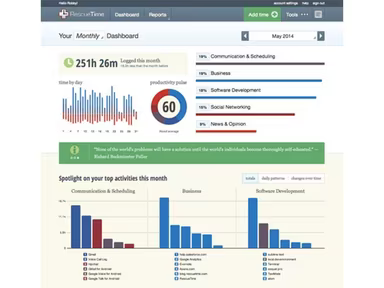
RescueTime is a cloud-driven productivity application designed for both desktop and mobile platforms. It simplifies the challenges associated with time management. This software provides various tools that help users analyze how they allocate their time on devices, equipping them with valuable insights to boost their productivity.
What Is RescueTime Best For?
Renowned for its user-friendly interface, RescueTime is accessible to everyone, regardless of their technical expertise. The tool works smoothly in the background, requiring little to no input from users.
RescueTime Pricing
The company provides adaptable pricing options. You can receive a tailored quote for RescueTime based on your organization's specific requirements and size.
RescueTime Integrations
RescueTime seamlessly connects with the following third-party applications:
Slack
Google Calendar
Microsoft 365
Microsoft Outlook
How Does RescueTime Work?
Here’s how to effectively navigate the dashboard and utilize the features of the software:
Track your time usage with daily summaries
Establish productivity targets for focused work and receive notifications when you achieve them
Dive into detailed categories and specific tasks
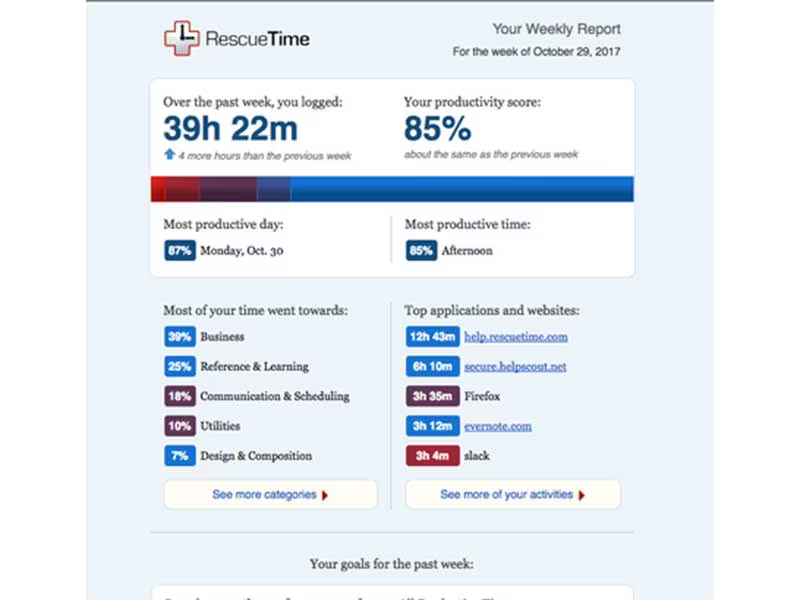
Create weekly or monthly reports for thorough analysis
Use FocusTime sessions for distraction-free work
Adjust session durations for maximum efficiency
Set up alerts to keep track of your progress
Get notified if you spend excessive time on distractions
You can also arrange a complimentary demo of RescueTime to discover more about the platform.
Who Is RescueTime For?
The following sectors utilize RescueTime's project management capabilities:
Accounting
Healthcare
Information Technology
Construction
Entertainment
Marketing
Advertising
Is RescueTime Right For You?
If you are seeking top-notch productivity tools that help you comprehend how you spend your time while providing insightful data to enhance your efficiency, then RescueTime could be an excellent fit for you. It adheres to stringent security protocols, employing end-to-end transport encryption, secure authentication methods, and encrypted data storage.
If you have further questions that remain unanswered in this review of RescueTime, please reach out to our customer support team at info@softwareseekers.com, and we will assist you in making an informed choice.