

Rodeo Software
Streamline your project management with Rodeo software. Track time, manage budgets, and collaborate effortlessly to ensure timely project completion.
The Rodeo software is designed to streamline project organization and management. It allows you to monitor time, control budgets, and collaborate effectively with your team, all while simplifying the invoicing process. While the initial configuration may require some foresight, Rodeo empowers you to finish projects punctually and stay within financial limits.
What Is Rodeo Software?
Overview
Rodeo software, presently referred to as Rodeo Drive, is a versatile project management and workflow solution designed to assist project managers in tracking time, overseeing budgets, collaborating in real-time, and invoicing clients. This platform features a customizable dashboard suitable for various applications, including creative agencies, marketing teams, freelancers, and more.
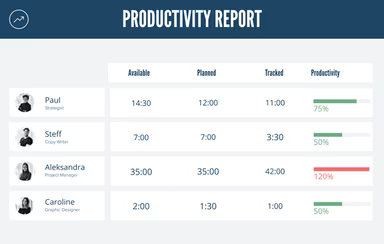
With functionalities such as budgeting, time tracking, task management, invoicing, and reporting, Rodeo Drive enhances visibility into financials and workflows, ultimately boosting both profitability and productivity. The goal of Rodeo is to simplify the entire project lifecycle, enabling businesses to operate more efficiently and expand their operations.
What Is Rodeo Software Best For?
A standout feature of the Rodeo management system is its extensive budgeting and financial reporting capabilities. Users are equipped with robust tools that allow for precise project cost estimations before the commencement of any project. Additionally, users can establish budgets and log both billable and non-billable hours, aiding organizations in making informed decisions to optimize profitability.
Rodeo Software Pricing
Rodeo offers two pricing tiers: Free and Achiever.
The Free Plan accommodates up to 10 users and includes essential project management features such as tasks, time tracking, and invoicing. It has a 2GB storage limit and permits 3 active projects.
The Achiever plan is priced at $14.99 per user each month. This option eliminates restrictions on the number of users and active projects. It also provides unlimited storage along with all core features like budgeting, expense tracking, estimates, and tailored workflows.
If you're interested in learning more about customized pricing for Rodeo software, feel free to reach out to us directly.
Please note: Pricing may vary.
Rodeo Software Integrations
Rodeo's management software can be integrated with:
QuickBooks
Exact
Xero
How Does Rodeo Software Work?
To get started with the Rodeo Drive project management tool, follow these steps:
Log in using your credentials to access the main dashboard.
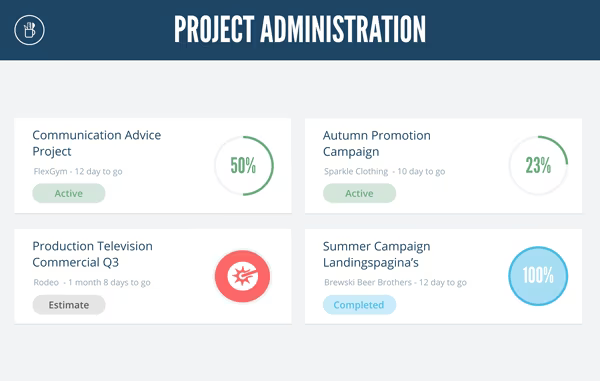
Select the 'Project' button and click on 'New project' to initiate a new project. Fill in the project name, client details, estimated budget, and deadline.
Click on 'Team' to add collaborators by searching for their names or email addresses. Assign permissions based on each role.
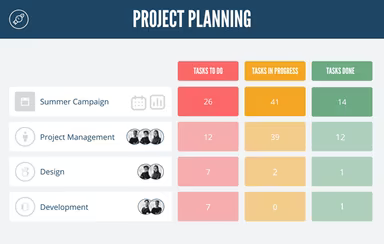
Navigate to the 'Planning' tab to divide work into milestones, phases, and individual tasks. Assign tasks to team members along with due dates.
Go to the 'Time Tracking' module within Rodeo Drive and start logging hours worked on specific tasks. Indicate whether the hours are billable or non-billable.
Under 'Finance', create estimates based on your project plan and tasks. Send these estimates for approval. As milestones are achieved, generate invoice receipts.
To manage expenses, record any costs associated with the project under 'Expenses'. Link these expenses to relevant tasks or clients for accounting purposes.
The 'Reports' section provides insights into budget versus actual spending, burn-down charts, and more for real-time project analysis.
Team members can update task statuses or add notes visible to others in the 'Timeline' stream.
You can watch a demo of Rodeo software for further insights into this project management tool.
Who Is Rodeo Software For?
Rodeo Drive is designed for organizations of all sizes across various sectors that need effective project management solutions. The platform is particularly beneficial for:
Creative agencies
Consulting firms
Video production studios
Marketing teams
Event organizers
Freelancers
Is Rodeo Software Right For You?
Your organization should consider adopting Rodeo if you're seeking an all-encompassing project management solution that enhances transparency and profitability. The Rodeo tool assists in pinpointing areas for improvement while ensuring accurate estimations are made; it also guarantees that projects are completed on schedule and within budget. Furthermore, its built-in collaboration tools promote better communication among stakeholders while ensuring accountability.
Additionally, security and compliance are top priorities for Rodeo. The platform holds a SOC 2 Type 2 certification which guarantees stringent data security measures. Regular third-party audits are conducted to maintain high standards. Customer information is safeguarded through bank-level encryption both during transmission and when stored. Strict access controls help maintain the confidentiality of sensitive project records.
User feedback suggests that many businesses have experienced growth thanks to Rodeo's capabilities. We encourage you to read more reviews from existing customers about this project management tool. For further inquiries, please reach out to us at info@softwareseekers.com.