

SecurTime
Streamline attendance tracking with SecurTime, the intuitive cloud-based workforce management software designed for multi-location businesses and mobile teams.
Essential Insights
Derived from customer feedback, SecurTime is a cloud-powered workforce management solution favored by HR departments and managers. It finds strong use among businesses with multiple locations, field teams, and those aiming for reliable attendance monitoring. Users often highlight its user-friendly interface and remote punch features, although the complexity of the setup process is a frequent issue.
Our Evaluation
SecurTime is particularly effective for medium to large enterprises that require ongoing supervision of remote or mobile teams. The pricing structure is more suitable for organizations that gain from centralized tracking and integrations, rather than smaller teams with simpler requirements. This software is an excellent choice for businesses that emphasize consistent attendance management across various sites.
What Is SecurTime Software?
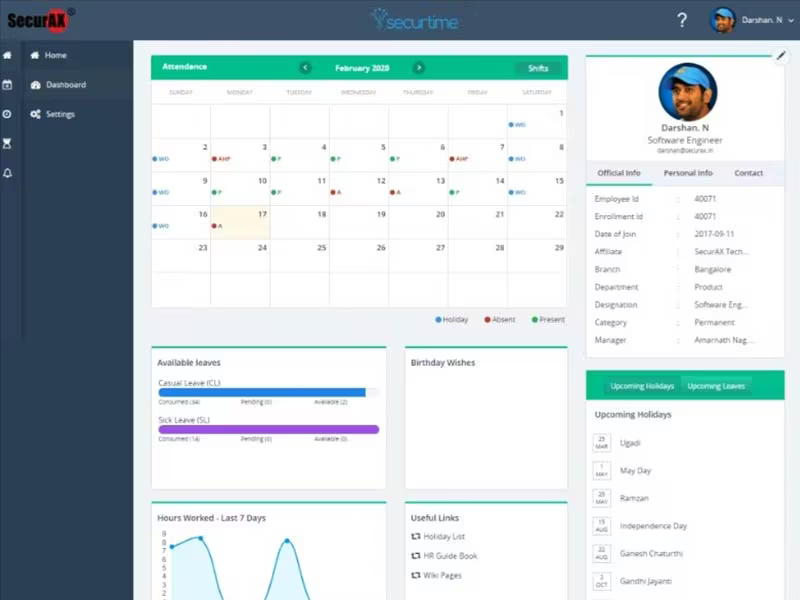
SecurTime is a time, attendance, and workforce management solution that operates in the cloud. Its intuitive interface combined with powerful features enables organizations to monitor time and evaluate the productivity of both on-site and remote employees. Key functionalities of SecurTime include tracking attendance, generating reports and analytics, scheduling shifts, managing timesheets, and fostering employee engagement.
What Is SecurTime Software Best For?
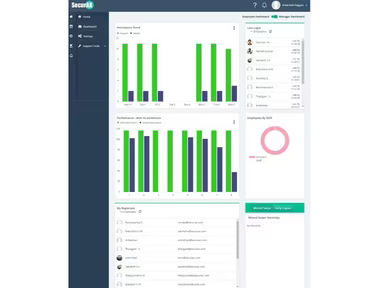
The reporting feature of SecurTime offers precise and comprehensive insights on employee presence and performance, productivity levels, costs, and compliance metrics. These reports are readily accessible through both the web interface and mobile application, enhancing visibility for businesses with remote teams. Additionally, it empowers HR personnel to oversee employee attendance effectively, minimizing payroll errors.
How Much Does SecurTime Cost?
The provider has three distinct pricing plans for SecurTime based on the specific needs and size of the organization. The plans are:
Track – Custom pricing
Engage – Custom pricing
Optimize – Custom pricing
For a personalized quote, click Get Pricing.
Please note that prices may vary.
SecurTime Software Integrations
SecurTime seamlessly integrates with various third-party applications, including:
greytHR
Ramco Systems
Zoho
SAP
1Clique
Paybooks
How Does SecurTime Software Work?
To utilize the software's features effectively, follow these steps:
Log in using your credentials.
Set up basic configurations such as company information, working hours, and leave policies.
Add employees either manually or by bulk importing from existing records.
Create access controls and specify user roles and permissions.
Establish time tracking methods like biometrics, web portal access, or mobile app usage.
Continuously review and adjust settings based on evolving company needs.
Generate insightful reports to track trends and pinpoint issues.
You can also arrange a complimentary demo of SecurTime to explore its functionalities further.
Who Is SecurTime Software For?
SecurTime is suitable for businesses of all sizes, from small startups to large corporations. It finds applications across various sectors such as:
Manufacturing
Transport and logistics
E-commerce
Retail
Banking and finance
Healthcare
Information technology
SecurTime Use Cases
Based on user feedback and current capabilities of SecurTime, here are some scenarios where this software excels in workforce management:
Multi-Location Businesses Managing Attendance: Companies with distributed teams can leverage real-time attendance tracking. Users can oversee multiple locations at once, decreasing errors and enhancing compliance. A reviewer mentioned that it “offers a unified view of all employees across different sites.”
Businesses Seeking Secure And Compliant Time Tracking: Organizations aiming to prevent time fraud or policy breaches find SecurTime advantageous. It consolidates attendance and leave data for improved oversight, simplifying compliance management.
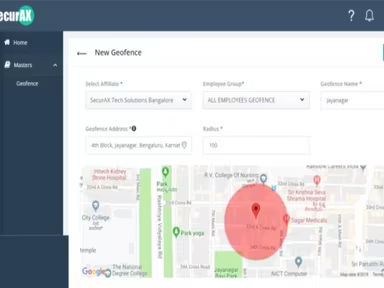
Remote Or Field-Based Workforce Management: Teams that operate off-site benefit from SecurTime’s cloud-based solution along with geo-fencing capabilities. This facilitates staff productivity monitoring without needing on-site supervision.
Organizations Streamlining Payroll And HR Integration: Companies aiming to minimize administrative burdens gain from SecurTime’s ability to directly input data into payroll and HR systems. This ensures precise payments and reduces errors, promoting operational efficiency.
Companies Adopting Biometric And Advanced Access Control: Businesses needing secure access monitoring can utilize SecurTime’s biometric features to enhance workplace security while automating access management.
SecurTime User Sentiments
Most Positive Sentiments
Ease of Use & Accessibility:
55% Positive
5% Negative
40% Neutral
A majority of reviewers commend SecurTime for its user-friendly interface and easy setup for monitoring attendance across various locations. One user remarked: "HR teams can effortlessly track total headcount for any day accurately," simplifying oversight tasks.
Least Positive Sentiments
Third-Party Integration Challenges:
35% Positive
25% Negative
40% Neutral
Certain users have noted that integrating with specific external systems can be slower or may require additional configuration.
Remote Workforce Management
Mobile App Issues:
50% Positive
10% Negative
40% Neutral
The cloud-based mobile application allows field teams to clock in and out while capturing location data efficiently, aiding managers in overseeing dispersed staff effectively. However, feedback indicates occasional issues with device binding or discrepancies between reports and actual punch data.
Reporting & Support
< li >Complex Setup:
< li >40% Positive < li >10% Negative < li >50% Neutral
A number of reviewers highlight that the detailed attendance reports along with responsive support enhance HR operations. The platform’s reporting tools assist teams in recognizing attendance patterns and ensuring compliance. However, some users have mentioned that onboarding new staff members and setting up schedules can be somewhat lengthy, requiring careful attention during initial configuration.
A user shared: “It took some time to train our team properly and set up all shifts correctly; however, once established, it becomes manageable.”
Is SecurTime Software Right For You?
If you’re searching for a workforce management solution that allows real-time tracking and management of your staff, then SecurTime could be an excellent choice for your organization. With its extensive features like advanced facial recognition technology—including mask detection, temperature checks, and thermal scanning—employee management becomes seamless. The software is not only secure but also highly scalable to cater to your organizational growth.
If you still have questions about whether SecurTime is suitable for you, reach out to us at info@softwareseekers.com. Our customer support team is ready to assist you in making an informed choice.