
Slack Software
Unlock seamless communication and collaboration with Slack, the AI work platform designed for remote teams and complex internal coordination.
Key Insights
Derived from customer feedback.
Slack serves as an AI-driven workspace utilized by remote teams and various internal departments, including IT, HR, customer support, marketing, and sales within sectors like manufacturing, education, and retail. Users appreciate the platform's seamless communication and real-time collaboration features, although they have pointed out the challenge of information overload in larger environments. Recent enhancements feature Slackbot capabilities, enabling it to manage intricate or repetitive tasks through admin-sanctioned skills.
Our Assessment
The Slack application is particularly well-suited for medium to large enterprises that oversee distributed teams and navigate complex internal dynamics. It effectively manages substantial communication flows, and many teams recognize significant benefits at the higher pricing tiers. However, as the number of users increases, the per-user costs can accumulate. We suggest this tool for organizations that emphasize structured internal communication and integrated workflows essential for everyday operations.
What Is Slack Software?
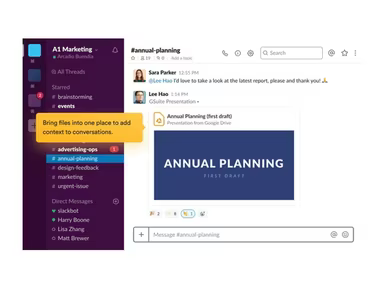
Slack is a cloud-based solution aimed at enhancing project collaboration and communication within businesses. Its suite of features includes instant messaging, group chats, file sharing, video calls, and compatibility with various third-party applications.
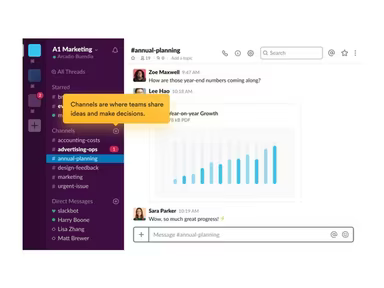
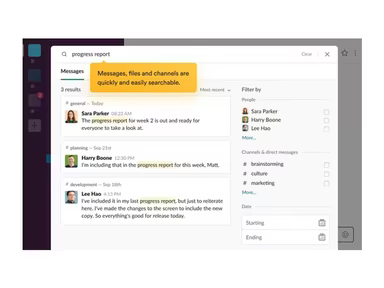
Teams can create dedicated channels on Slack, functioning as central hubs for discussions related to specific projects, topics, or departments. These conversations are fully searchable, allowing users to easily locate previous dialogues and shared documents. Slack has established itself as a top-tier digital communication platform within project management and is widely embraced by teams across various sectors and organizational structures.
What Is Slack Software Best For?
Slack excels at organizing team communication through channels that foster collaboration by project, topic, department, or work category. With both public and private channels available, it simplifies the process of connecting and collaborating across different departments, locations, time zones, and even between organizations. Information shared within a channel is accessible to all members of that channel, ensuring that teams remain informed and aligned regardless of their physical location. Organizations grappling with scattered email chains, missed updates, or sluggish inter-departmental communication often find significant benefits in using Slack. It consolidates all relevant individuals, files, and discussions into one focused area, facilitating smoother workflows without the usual back-and-forth interruptions.
How Much Does Slack Software Cost?
The pricing for Slack software begins at $8.75 per user per month for the Pro plan. This tier includes unlimited message history, limitless app integrations, group meetings, external messages to groups, and AI-generated conversation summaries. The additional pricing tiers are as follows:
Free – $0/user/month
Business+ – $18/user/month
Enterprise+ – Custom pricing
Organizations should also consider the following potential expenses in addition to the base subscription fee:
Implementation And Workspace Configuration: Typically ranges from $0 to $50,000 depending on whether it’s self-setup or enterprise onboarding with training and rollout support.
Data Migration: Usually falls between $1,500 and $20,000 for transferring messages, files, and channel structures from platforms such as Microsoft Teams or Google Chat.
SSO/Identity Provider Integration: Generally ranges from $500 to $5,000 for setting up SAML SSO and connecting identity tools like Okta or Azure AD.
Third-Party Automation Platforms: Typically costs around $600 to $15,000 per year for workflow automation tools like Zapier or Workato used with Slack.
App And Integration Licensing: Can range from $3,000 to over $100,000 per year based on the number of paid tools such as Salesforce or Zoom utilized.
Premium/Priority Support: Usually adds about $5,000 to $30,000 per year for enhanced support response times.
Slack Atlas Add-on: Generally costs around $2 to $4 per user per month for features like employee profiles and improved company directory functionalities.
User reviews often reflect positively on Slack’s pricing structure; most find it offers good value compared to its features. However, a few users mention that it may be slightly pricier for smaller organizations. For precise pricing tailored to your organization’s requirements, it’s advisable to request a custom estimate for Slack software.
The pricing is subject to change.
Slack Software Integrations
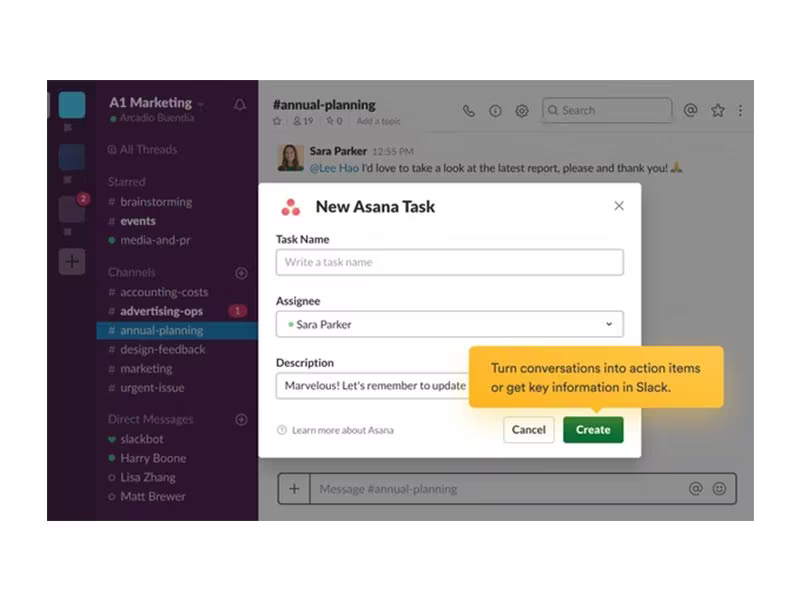
Slack boasts compatibility with an array of third-party services. Workspace administrators can utilize various APIs that allow users to create 'custom connects' with the platform.
Here are some applications that integrate seamlessly with Slack (many of which are regarded as top apps for effective networking within their respective fields):
Asana
GitHub
Zoom
Salesforce
Google Drive
ChatGPT
Cursor AI
Box software
How Does Slack Software Work?
Your entire team can start using the Slack project collaboration software by following these steps:
Log in using your provided email address and password associated with your team's Slack workspace.
You will be directed to your Slack workspace home where all channels are displayed on the sidebar.
Select an existing channel name from the sidebar to join a conversation; this will open the channel displaying previous messages and allow for interaction.
You can upload files, react to messages using emojis, or send direct messages to other team members.
To keep organized, pin important messages, create new channels for projects, or engage in one-on-one chats with colleagues.
The search bar at the top enables quick access to previously discussed messages or files across all channels.
You can tailor your Slack experience by adding apps and adjusting notification settings through your user profile icon.
Easily navigate through conversations, channels, direct messages, files, and more utilizing the left-side menu.
A complimentary demo of Slack software can also be scheduled to explore its full range of functionalities.
Who Is Slack Software For?
This tool is suitable for business organizations of varying sizes. Its features and integrations make it particularly advantageous for remote teams. Here are some industries and functions that often utilize Slack as their primary communication platform:
Engineering
Financial services
Education
Retail
Media
IT
Sales
Project management
Human resources
Marketing
Customer service
Slack Software Use Cases
An analysis of user feedback alongside Slack’s capabilities reveals key scenarios where this software proves beneficial for remote teams and organizations managing extensive internal communications:
Distributed Teams Operating Asynchronously Across Time Zones: Global teams frequently encounter challenges when trying to synchronize working hours. Relying solely on meetings can hinder progress. Without a unified system in place, important decisions often get lost in email exchanges. In such cases, Slack can be invaluable for teams needing to keep work flowing without real-time coordination.
Internal Teams Replacing High-Volume Email Communication: Organizations heavily reliant on email often face issues where essential information gets overlooked amidst growing threads. This concern escalates when multiple departments are involved without a designated space for discussions. For teams seeking to streamline routine communication out of inboxes into organized channels that everyone can follow without being copied on every message exchange, Slack is worth considering.
Small Teams Managing Projects Without Dedicated Project Management Software: Smaller teams may initially manage projects using various messaging apps and emails; however this approach can become unmanageable as tasks multiply. Tracking responsibilities and document versions becomes increasingly challenging without a collaborative workspace. For these teams at this juncture, Slack may provide an effective starting point by combining communication with file sharing and basic task management until they require full project management tools.
Customer Support And Client-Facing Teams Managing Fast Response Workflows: Customer support often involves situations requiring rapid input from colleagues across different departments. The speed of internal communication directly impacts customer resolution timelines. When coordination relies on email or phone calls delays can occur; thus making Slack a suitable option in environments where swift internal conversations tied to specific cases enhance resolution efficiency.
HR Teams Coordinating Approvals And Document Sharing Across Departments: HR professionals managing onboarding processes or policy updates frequently find themselves chasing responses across various departments while maintaining lengthy email threads with multiple stakeholders. This back-and-forth process can significantly delay critical deadlines affecting employees awaiting outcomes. For HR teams facing such challenges, Slack offers a solution where approvals and document sharing can be expedited beyond traditional email limitations.
Is Slack Software Right For You?
If your goal is to enhance communication within your business while fostering quick decision-making and real-time collaboration among team members, then considering Slack could be beneficial. Its adaptable nature regarding app selection and add-ons along with its messaging-first approach makes it an appealing alternative to conventional workplace communication tools.
The versatility of the platform also sets it apart in workplace communications. Designed to seamlessly integrate into your organization’s workflow while providing valuable features such as search functionality and company directories enhances its appeal. Many reputable companies including OpenAI, IBM, and Stripe trust its capabilities.
Your organization's data security is paramount; hence Slack ensures a secure communication environment equipped with features like data loss prevention alongside compliance with major standards including HIPAA, FedRAMP, GDPR ,and ISO/IEC 27001. Compared to email systems which may lack organization and security measures—Slack stands out as a reliable tool in today’s business landscape ensuring data safety during operations.
If you want further insights into how existing users feel about the software's performance consider reading reviews on Slack. For more details reach out via info@softwareseekers.com.