logo

TimeCamp

TimeCamp merges time tracking with project management, simplifying the process of recording hours and overseeing tasks. While updates may be infrequent and take...

0.00 | 0 Reviews

TimeCamp merges time tracking with project management, simplifying the process of recording hours and overseeing tasks. While updates may be infrequent and take...

Product Overview

TimeCamp merges time tracking with project management, simplifying the process of recording hours and overseeing tasks. While updates may be infrequent and take time to roll out, the platform's integration capabilities and reporting functionalities greatly improve productivity and project supervision. In summary, TimeCamp is a valuable tool for efficient time management and workflow organization.
Product Snapshot

Product Details

What Is TimeCamp?

TimeCamp is a comprehensive time-tracking and project management tool aimed at helping organizations optimize their workflows, improve team cooperation, and increase overall productivity. With this software, you can easily track and analyze your working hours, projects, and tasks.

Featuring a variety of powerful tools like automated time tracking, in-depth reporting, invoicing capabilities, and budget management, TimeCamp enables users to make data-driven choices. Additionally, it generates insightful reports that reveal the advancement of different projects.

What Is TimeCamp Best For?

The automatic time-tracking functionality of TimeCamp allows users to keep tabs on their working hours and gain insights into their productivity habits. By recording the time spent on different tasks, applications, and websites, it removes the hassle of manual data entry while providing precise, real-time information.

This robust feature assists companies in efficiently allocating resources, pinpointing process bottlenecks, and empowering employees to utilize their time more effectively.

TimeCamp Pricing Plans

There are three pricing options available:

  • Freemium – Free of charge.

  • Basic - $6.99 per month

  • Pro - $9.99 per month

  • Enterprise – Click Get Pricing for a tailored quote.

TimeCamp Integrations

The extensive integration capabilities of TimeCamp allow users to connect the software with their existing technology stack. It works seamlessly with:

  • Airtable

  • GitLab

  • Trello

  • Notion

  • ClickUp

  • iCal

  • Asana

  • Jira, among others.

How Does TimeCamp Project Management Software Work?

If you're ready to start tracking your time with TimeCamp, follow these steps:

  1. Log in with your credentials to access the dashboard.

  2. Select "Invite" in the Settings tab to add team members by entering their email addresses and assigning roles.

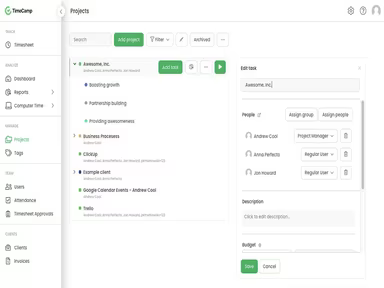
  3. In the "Projects" tab, click on the "Add project" button.

  4. Fill in the project name, description, and other pertinent information.

  5. Create tasks for the project by clicking on the "Add task" button.

  6. Set your time tracking preferences as desired.

  7. Tweak settings like idle time detection, time rounding, or automatic time tracking.

  8. Project managers can monitor productivity through the "Dashboard."

  9. Utilize the "Reports" tab to produce detailed reports regarding various facets of your team's efforts.

Who Is TimeCamp For?

TimeCamp provides an effective solution for tracking time across businesses of all scales, from emerging startups to established corporations. The software is suitable for a variety of sectors such as:

  • Software development

  • Marketing and advertising agencies

  • Consulting firms

  • Graphic design and creative agencies

  • E-commerce businesses

  • Nonprofits

  • Freelancers and remote teams

Is TimeCamp Time Tracking Software Right For You?

No matter if you are a freelancer, a small business owner, or a member of a large organization, TimeCamp offers an effective way to monitor billable hours. It produces accurate reports while simplifying workflows.

A business should consider implementing TimeCamp when aiming to:

  • Enhance time management skills

  • Gain insights into productivity levels

  • Simplify project and task oversight

  • Improve team collaboration

  • Track billable hours and expenditures

  • Monitor budget allocations

If you're interested in understanding how current users benefit from this software, we recommend reading reviews about TimeCamp. For further assistance, feel free to reach out to us at info@softwareseekers.com.

Project Management Software Features

dashboard
free plan
reporting
scheduler
dashboards
free trial
mobile app
purchasing
ai features
file sharing
integrations
telemedicine
collaboration
mobile access
time tracking
bid management
patient portal
budgeting tools
e prescriptions
email marketing
lead generation
marketing tools
quality control
rent collection
task management
asset management
automation tools
custom workflows
document sharing
easy integration
expense tracking
lab integrations
lease management
maintenance logs
project tracking
shared calenders
budget management
claims management
data importexport
project templates
safety management
tenant management
time zone support
content management
customizable forms
data visualization
equipment tracking
project management
project scheduling
shop floor control
team communication
alertsnotifications
campaign management
communication tools
contract management
document management
employee engagement
employee management
employee onboarding
facility management
incident management
production planning
property accounting
reporting analytics
resource allocation
workforce analytics
financial management
inventory management
maintenance requests
patient demographics
portfolio and assets
real time monitoring
bill of materials bom
billing and invoicing
business intelligence
customer segmentation
equipment maintenance
inspection management
partner data exchange
product health scores
scalable architecture
work order management
attendee communication
customizable workflows
facilities maintenance
performance management
benefits administration
change order management
compensation management
registration management
reporting and analytics
social media management
supply chain management
workflows and approvals
business intelligence bi
communication and access
documents and compliance
manufacturing management
subcontractor management
training and development
integrated team calendars
stakeholder collaboration
access controlspermissions
human resources management
maintenance and operations
attendance and time tracking
employee self service portal
integration with erp systems
product lifecycle management
centralised product portfolio
venue and resource management
agenda and schedule management
compliance and risk management
human resources management hrm
sales and marketing automation
speaker and content management
audience interaction technology
data driven product performance
employee information management
on site and virtual event tools
project planning and scheduling
tenant and lease administration
appointment managementscheduling
product lifecycle management plm
integration with financial systems
production planning and scheduling
recruitment and applicant tracking
financial management and accounting
customer relationship management crm

Pros

  • Scalable
  • Automatic time tracking
  • In-built invoicing
  • Extensive integrations

Cons

  • Steep learning curve
  • Slow interface

Price

Professional

$0

Get Free Guidance from Our Solution Experts.

Ratings

0.00 | 0 reviews

Ratings Distribution

Positive

0%

Neutral

0%

Negative

0%

User Reviews

No reviews yet

Be the first to share your experience with TimeCamp.

Frequently Asked Questions

Find answers to the most common queries about our software recommendation service.

Yes, API access is available.

Yes, API access is available.

TimeCamp supports English, German, French, Portuguese, Polish, and Spanish.

It can integrate with various applications, such as Jira, iCal, ClickUp, etc.

It is compatible with Android and iOS devices.

The free version of TimeCamp offers unlimited users, projects, and tasks and includes mobile and desktop apps. If you opt for the Basic plan, it costs $7.99 per user per month, whereas the Pro plan is more popular and charges $10.00 per user monthly. For more advanced features, the Enterprise plan is available on request for a custom quote.

TimeCamp is suitable for small and large organizations and supports various industries, including software development, consulting firms, marketing agencies, nonprofits, among others.