logo

Tinq

Keeping track of time, organizing schedules, and overseeing projects can be challenging and take up precious resources for businesses. Tinq, a cloud-based platf...

0.00 | 0 Reviews

Keeping track of time, organizing schedules, and overseeing projects can be challenging and take up precious resources for businesses. Tinq, a cloud-based platf...

Product Overview

Keeping track of time, organizing schedules, and overseeing projects can be challenging and take up precious resources for businesses. Tinq, a cloud-based platform that includes facial recognition among its offerings, empowers organizations of any scale to achieve seamless efficiency. Discover the features of Tinq to streamline your organization’s daily activities.
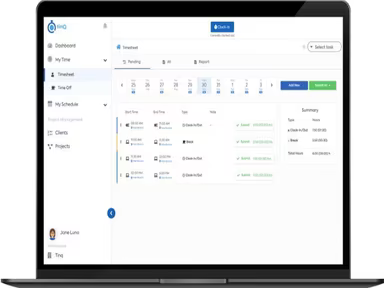
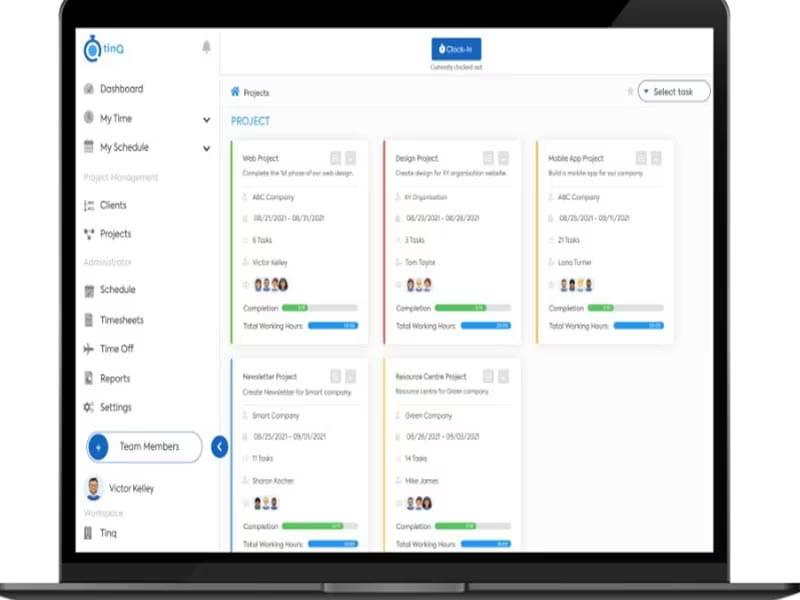
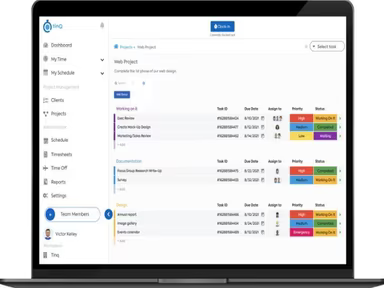
Product Snapshot

Product Details

What Is Tinq?

Overview

Tinq is an innovative cloud-based tool designed for tracking time, scheduling tasks, and managing projects effectively. This software enables users to monitor their work hours across multiple devices, personalize their dashboards, and adjust schedules seamlessly while on the move. Additionally, Tinq offers a user-friendly clock-in/out feature that utilizes facial recognition technology. It stands as a versatile and efficient solution, empowering organizations to reach their objectives effortlessly.

What Is Tinq Best For?

Tinq is primarily recognized for its simplicity and user-friendly design. The intuitive interface allows users to easily track their time, manage schedules, and oversee project advancements. With several advanced functionalities, it ensures that users can accurately monitor their attendance and time, even when they are away from their desks.

Tinq Pricing

The vendor provides four distinct pricing options:

  • Starter Pack: $0/user/month

  • Time and Attendance: $5/user/month

  • Project Management: $20/user/month

  • Sales: $20/user/month

The pricing structure may vary based on your organization's unique needs and scale. You can request a customized pricing estimate for Tinq that aligns with your specific requirements.

Please note that the pricing is subject to change.

Tinq Integrations

Tinq offers integration with various third-party applications to facilitate detailed timesheet reporting, including:

  • QuickBooks

  • Square

  • Gusto

How Does Tinq Work?

Here’s a quick guide on how to navigate through the dashboard and utilize the features of Tinq:

  1. Log in with the credentials provided during setup.

  2. Customize your preferences, such as language settings, data storage choices, and notification options.

  3. Import necessary data or files into Tinq, including customer info or inventory details.

  4. Create a project or task by selecting the ‘New Project’ or ‘New Task’ button and following the instructions.

  5. Add team members or collaborators by entering their email addresses and assigning appropriate roles.

  6. Explore features like task tracking, document sharing, and reporting to enhance your workflow.

  7. Export timesheet reports to prepare for payroll submission.

If you want to explore more about Tinq’s functionalities, consider scheduling a complimentary demo.

Who Is Tinq For?

Tinq is suitable for organizations of all sizes due to its high scalability. The software is utilized across various industries including:

  • Manufacturing

  • Construction

  • Healthcare

  • Retail

  • Food and beverages

Is Tinq Right For You?

If you are in search of a comprehensive tool for time tracking, scheduling, and project management that includes advanced features, Tinq may be an ideal fit. It offers secure data storage options to employees, helping to mitigate labor disputes.

The software also comes with additional features like device tagging and pin verification to enhance your time-tracking experience. Tinq effectively addresses challenges such as inaccurate time recording and scheduling difficulties, streamlining your workday management.

If you wish to discover more about Tinq software, please reach out to our customer support team at info@softwareseekers.com for a thorough overview of the software to help you decide if it meets your investment needs.

Project Management Software Features

dashboard
free plan
reporting
scheduler
dashboards
free trial
mobile app
purchasing
ai features
file sharing
integrations
telemedicine
collaboration
mobile access
time tracking
bid management
patient portal
budgeting tools
e prescriptions
email marketing
lead generation
marketing tools
quality control
rent collection
task management
asset management
automation tools
custom workflows
document sharing
easy integration
expense tracking
lab integrations
lease management
maintenance logs
project tracking
shared calenders
budget management
claims management
data importexport
project templates
safety management
tenant management
time zone support
content management
customizable forms
data visualization
equipment tracking
project management
project scheduling
shop floor control
team communication
alertsnotifications
campaign management
communication tools
contract management
document management
employee engagement
employee management
employee onboarding
facility management
incident management
production planning
property accounting
reporting analytics
resource allocation
workforce analytics
financial management
inventory management
maintenance requests
patient demographics
portfolio and assets
real time monitoring
bill of materials bom
billing and invoicing
business intelligence
customer segmentation
equipment maintenance
inspection management
partner data exchange
product health scores
scalable architecture
work order management
attendee communication
customizable workflows
facilities maintenance
performance management
benefits administration
change order management
compensation management
registration management
reporting and analytics
social media management
supply chain management
workflows and approvals
business intelligence bi
communication and access
documents and compliance
manufacturing management
subcontractor management
training and development
integrated team calendars
stakeholder collaboration
access controlspermissions
human resources management
maintenance and operations
attendance and time tracking
employee self service portal
integration with erp systems
product lifecycle management
centralised product portfolio
venue and resource management
agenda and schedule management
compliance and risk management
human resources management hrm
sales and marketing automation
speaker and content management
audience interaction technology
data driven product performance
employee information management
on site and virtual event tools
project planning and scheduling
tenant and lease administration
appointment managementscheduling
product lifecycle management plm
integration with financial systems
production planning and scheduling
recruitment and applicant tracking
financial management and accounting
customer relationship management crm

Pros

  • User-friendly interface
  • Robust time tracking
  • Seamless scheduling
  • Free basic training included

Cons

  • Reliance on internet connection
  • Some features tend to slow down at times
  • Initial setup complexity, according to some user reviews

Price

Professional

$0

Get Free Guidance from Our Solution Experts.

Ratings

0.00 | 0 reviews

Ratings Distribution

Positive

0%

Neutral

0%

Negative

0%

User Reviews

No reviews yet

Be the first to share your experience with Tinq.

Frequently Asked Questions

Find answers to the most common queries about our software recommendation service.

Tinq provides a subscription-based pricing model to its users. Click on "Get Pricing" to see a suitable pricing plan for your business.

Tinq, an internet connected dedicated device solution, is used in several industries, such as food and beverages, manufacturing, healthcare, construction, and retail.

Tinq supports one language currently: English.

Yes, Tinq supports Android and iOS mobile devices.

No, Tinq does not offer an API to its clients.

Tinq integrates with Square, Gusto, and QuickBooks.

Tinq audits employee features, including detailed time log, employee status, and record breaks. Moreover, it can also track hours worked by team members on specific tasks to ensure accuracy.

Tinq offers a help desk, email, a forum, FAQs, a phone, a knowledge base, and a 24/7 live representative. The software also offers chat support free of cost.

Yes, Tinq offers a free US-based phone support option.