

WorkComposer
Streamline your workflow and boost productivity with WorkComposer, the ultimate work management software for seamless collaboration and project coordination.
Are you overwhelmed by managing various tasks and finding it hard to keep up with deadlines? Your search ends here with WorkComposer, the premier software for work management. Streamline your processes, boost teamwork, and maximize your efficiency. With its effortless integration and user-friendly interface, WorkComposer stands out as the perfect answer for all your project management requirements.
What Is WorkComposer?
Overview
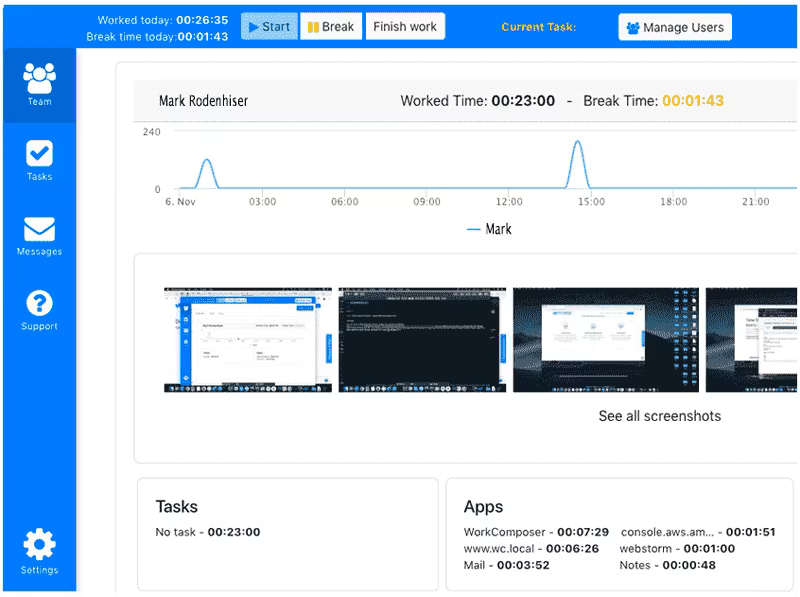
WorkComposer is an automated solution designed for time tracking and employee monitoring, tailored specifically for remote and distributed teams. This software enables managers to oversee the amount of time employees dedicate to their tasks, while also capturing screenshots at predetermined or random intervals. Furthermore, it tracks the websites and applications that employees engage with, presenting their screen activities in a fusion mode that respects user privacy. WorkComposer serves as a time-tracking tool focused on enhancing productivity within business organizations through its extensive and valuable features.
What Is WorkComposer Best For?
The primary advantage of WorkComposer lies in its robust time-tracking capabilities. Designed with remote and distributed teams in mind, it includes a time tracker that assesses how long each employee spends on work-related tasks, takes screenshots at designated intervals, and monitors online browsing and application usage. Through these functionalities, WorkComposer allows businesses to gain valuable insights into their employees’ productivity and overall efficiency.
WorkComposer Pricing
This software offers the following pricing tiers:
Standard: $3.3/user/month
Premium: $5.5/user/month
Enterprise: Custom pricing
You can also request a tailored pricing plan for WorkComposer based on your organization’s specific requirements.
WorkComposer Integrations
WorkComposer provides users with the ability to integrate the software into their existing technology stack via API access.
How Does WorkComposer Work?
To start using the WorkComposer project management tool, follow these steps:
Log in to your WorkComposer account.
After logging in, you will be taken to the dashboard where you can view your team's real-time activity.
To begin tracking time, click the 'Start Tracking' button manually or enable automatic tracking for chosen apps and websites.
You can modify project and task names from the 'Projects' tab located in the left sidebar.
To access recorded time data, go to the 'Reports' tab and select your preferred date range.
You can also view screenshots taken during the tracked period by selecting the 'Screenshots' tab.
Consider watching a demo of WorkComposer to explore its features further.
Who Is WorkComposer For?
The WorkComposer software is suitable for businesses of all sizes. Small and medium-sized enterprises (SMEs) will find great value in its intuitive interface. With cost-effective features, users can optimize their operations and enhance productivity effectively.
On the other hand, larger corporations can take advantage of WorkComposer's powerful capabilities to manage intricate organizational structures, diverse teams, and large employee databases. This software is applicable across various industries including:
Manufacturing
Retail
Healthcare
Hospitality
Finance
Technology
Is WorkComposer Right For You?
If you are seeking an easy-to-use yet dependable project time-tracking solution, then WorkComposer is worth considering. The software ensures complete visibility, allowing team members to focus on their tasks while minimizing distractions.
Apart from its comprehensive project management tools, WorkComposer places a high priority on user data security. It employs rigorous security measures to protect sensitive information.
This includes encrypted communication channels, multi-factor authentication, and routine data backups to maintain data integrity and guard against unauthorized access. Additionally, WorkComposer adheres to industry-standard security and privacy regulations.
We suggest checking out reviews of WorkComposer to understand what current users think about the software. For further inquiries, please reach out to Software Finder at info@softwareseekers.com.