

Wrike Software
Simplify project management with Wrike. Streamline workflows, enhance collaboration, and empower your team to conquer complex tasks efficiently.
Wrike is a flexible platform designed to make project management easier. It helps you to optimize your workflow, improve teamwork, and reach the best outcomes. Equip your teams to tackle intricate projects effectively with its user-friendly design and comprehensive functionalities. Experience the strength of effortless project management now with Wrike.
What Is Wrike Software?
Wrike is an all-encompassing project management platform designed to enhance collaboration and boost employee productivity. It enables teams to maintain organization, prioritize their tasks, and accomplish objectives more swiftly.
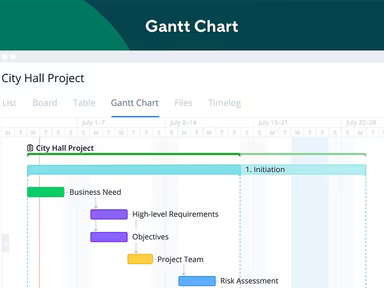
With its user-friendly interface and powerful features, Wrike is an excellent choice for businesses of any size looking to plan, monitor, and manage projects in real time. The software incorporates automated workflows, detailed reporting, and effortless integration with widely-used tools.
What Is Wrike Software Best For?
Many users of Wrike highlight its standout functionality: dynamic request forms. These customizable forms allow users to capture vital project details effectively. They streamline the intake process, minimize manual labor, and ensure that teams have all the necessary information to execute tasks proficiently. Additionally, Wrike distinguishes itself from other similar tools through its adaptability and extensive customization options.
How Much Does Wrike Cost?
Wrike offers a free plan for businesses looking to get started, while the basic plan is priced at approximately $10 per month for each user. The available plans cater to both small and medium-sized businesses as well as larger enterprises.
Free Plan: suitable for small teams (up to 5 users)
Team Plan: $9.80 per user per month (up to 15 users)
Business Plan: $24.80 per user per month (5-200 users)
The Professional and Business plans are billed annually. Additionally, Wrike provides Enterprise and Pinnacle packages:
Enterprise: tailored for large teams requiring enterprise-level security and scalability
Pinnacle: the most sophisticated plan designed for teams with intricate needs
Moreover, users can opt for add-on packages to integrate with their current accounts, including:
Wrike Integrate
Wrike Two-Way Sync
Wrike Lock
Wrike Marketing Insights
This software provides diverse pricing options to accommodate various organizations and their developing requirements. Request a personalized Wrike price quote today.
Wrike Software Integrations
Wrike seamlessly connects with numerous third-party software applications. Some notable integrations include:
Salesforce
Slack
Adobe Creative Cloud
Tableau
Jira
Additionally, Wrike features an open RESTful API, allowing connections with existing tech stacks. The add-on service, Wrike Integrate, facilitates custom integrations with over 400 cloud-based and on-premises applications.
How Does Wrike Software Work?
To begin using the Wrike platform, follow these straightforward steps:
Log in to access the dashboard.
Create your workspace by adding your company logo and selecting a theme color.
Select "Project" from the drop-down menu. Enter a project name and description, then choose an appropriate template.
Click the "+" icon next to the project title and select "Folder." Name the folder clearly to represent its tasks.
Select "Task," provide a task name, description, assignee, and due date.
Add team members by clicking "User Management." Input their email addresses and assign access levels.
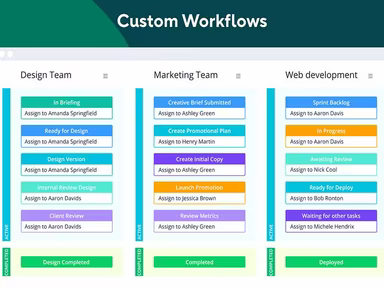
Customize your workflows by selecting "Workflow." Define various stages of your project and create custom statuses for tasks.
Create project dashboards for progress tracking. Click on the "Dashboards" tab on the left sidebar, then click the "+" icon to create a new dashboard.
Connect Wrike with your preferred tools or applications through the "Apps & Integrations" section.
Select the "Reports" tab in the left sidebar. Generate real-time reports to evaluate your project performance.
Monitor project updates and task assignments via the Inbox and Notification Center.
You can schedule a complimentary demo of Wrike through Watch Demo to see how it operates.
Who Is Wrike Software For?
Wrike is designed for organizations of any size, ranging from small enterprises to large corporations. Teams across multiple fields can take advantage of Wrike's capabilities, including:
Marketing
Creative sectors
IT departments
Operations
Product development
Professional services
Project management
The software also provides specialized use cases tailored for industries such as:
Education
Finance
Healthcare
Manufacturing
Retail
Is Wrike Right For You?
If you seek an all-in-one project management solution that fosters better collaboration among team members while enhancing productivity, then Wrike could be an excellent fit for your organization. Its customization capabilities allow you to tailor it specifically to achieve desired business outcomes.
If your organization needs scalable solutions that adapt over time, Wrike is well-suited for you. Since pricing plans are based on user counts, you can upgrade to more advanced tiers without needing to switch platforms.
Around 20,000 businesses globally utilize Wrike, including renowned names like Procter & Gamble, Lyft, Ogilvy, Siemens, and Syneos Health. Still uncertain about whether this software suits your requirements? Reach out to our customer support team at info@softwareseekers.com for assistance in making the right choice.