

Zenput
Optimize your operations with Zenput, the all-in-one solution for task management and performance monitoring in convenience stores, restaurants, and grocers.
Zenput is an innovative operations execution platform designed specifically for convenience stores, restaurants, and grocery businesses. It provides a comprehensive set of tools that facilitate task creation, incident management, audits, and performance tracking. With its mobile features and incident management functionalities, Zenput helps maintain rigorous safety and quality standards. Discover what Zenput can do for your business—reach out to request a demo today.
What Is Zenput Software?
Zenput serves as a powerful operations execution platform tailored for convenience stores, restaurants, and grocers. It provides a wide array of tools designed for task creation, incident tracking, audit management, and performance monitoring, all centralized in one workspace.
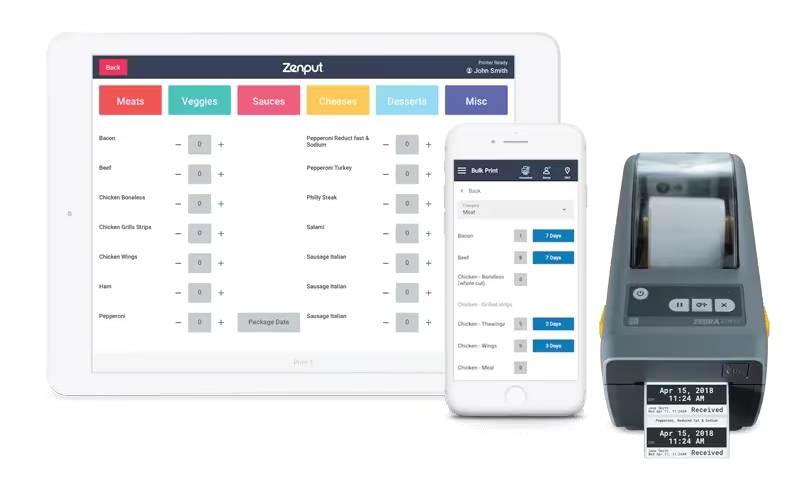
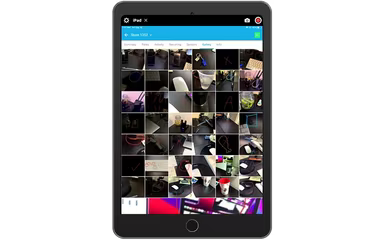
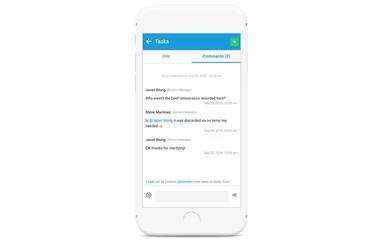
This software allows users to generate corrective action tasks and digitally document various quality metrics, including product quality images, temperature readings, and wait times. This functionality enhances the ability to monitor product quality effectively and expedites the resolution of potential issues. Additionally, Zenput consolidates all quality-related data in a single location, facilitating trend analysis and pinpointing areas that require improvement.
What Is Zenput Software Best For?
Zenput is particularly recognized for its mobile features and incident management capabilities. Multi-unit operators can access the software from any mobile device, boosting productivity and enabling them to carry out their responsibilities from virtually anywhere. Tasks such as completing audits and checklists, as well as ensuring food safety, can be performed with ease.
The incident management component of Zenput stands out by assisting businesses in upholding high safety and security standards. Employees can swiftly create incident reports using pre-built forms that capture essential details like victim information, injury descriptions, and relevant images, all secured with digital signatures. This ensures prompt and effective responses to any incidents that may arise.
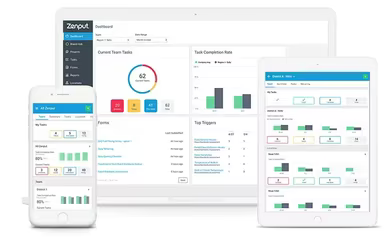
Zenput also sets itself apart by offering detailed performance insights through its trend analysis, reporting features, and data visualization tools. This empowers operations leaders to gain a thorough understanding of store performance, identify improvement opportunities, and make well-informed decisions to foster growth.
Moreover, Zenput seamlessly connects with IoT devices like Bluetooth probes and temperature sensors to facilitate temperature reporting. This unique capability allows for real-time data capture, providing a solution that stands out in the market.
Zenput Pricing
Zenput follows a subscription-based pricing model designed to meet the diverse needs of different organizations. The company provides four pricing plans: Essentials, Premium, Advanced, and Brand-Wide.
The Essentials plan includes essential functionalities for digital operations execution.
The Premium plan is the most favored choice, allowing for comprehensive management of all operational tasks.
The Advanced plan caters to those seeking advanced integration and insights.
The Brand-Wide plan is intended for franchisors aiming to implement initiatives that provide visibility and control across their brands.
The exact pricing details for these subscription plans are not publicly disclosed.
If you're uncertain which Zenput pricing plan best suits your business needs, you can obtain a personalized pricing guide by reaching out through info@softwareseekers.com!
Zenput Integrations
This restaurant operations management software can easily integrate with various third-party applications via an API. Such integration streamlines workflows and ensures efficient data transfer between different platforms. By connecting Zenput with other tools and systems, organizations enhance their operations while minimizing manual data entry efforts and boosting productivity.
How Does Zenput Software Work?
Zenput project management software is accessible on both desktop and mobile devices, allowing teams to oversee store operations from any location. This transition eliminates outdated manual processes reliant on paper while centralizing all operational data in one platform. Here’s how you can begin using Zenput software:
Create a Zenput account on the official website.
Log into your account to explore its features.
Utilize the software's functions to input and monitor information like temperature checks, daily checklists, and product quality images.
Check the main dashboard to track task progress and view live reporting.
Who Is Zenput For?
Zenput software is crafted for food service businesses of any scale. It caters to multi-unit food service operators as well as retail outlets, convenience stores, and grocery chains seeking a thorough solution for task management, food safety compliance, and operational procedures. This leading platform earns trust from globally recognized brands such as Chipotle, Domino’s, P.F. Chang’s, Five Guys, Taco Bell, Global Partners, and KFC to manage operations across over 60,000 locations in more than 100 countries.
Is Zenput Software Right for You?
As a compliance management solution tailored for food service businesses, Zenput enhances operational efficiency through comprehensive tools that provide performance insights. Users can manage food safety standards effectively while optimizing employee behavior and minimizing operational costs alongside risk mitigation.
The company has rolled out various add-on features designed to help multi-unit operators streamline their workflows while enhancing customer and employee experiences. It digitizes food safety processes to avert costly errors while safeguarding customers and staff alike. Additionally, the Zenput project management tool supports consistent adherence to brand standards while simplifying marketing efforts along with human resources processes. It also aids in COVID-19 response initiatives through digital checklists and safety templates.
User feedback emphasizes its user-friendliness and advanced capabilities as primary factors influencing their decision to choose this software. The mobile accessibility further enhances its versatility by allowing users to access essential data anytime and anywhere.
In summary, Zenput delivers transparency in store operations while boosting accountability for critical tasks. Its extensive feature set combined with an intuitive interface makes it an excellent option for businesses aiming to modernize their operations while ensuring compliance with food safety regulations.
Schedule a call with one of our experts to determine if Zenput software aligns with your food service business needs.