

Tikit
Streamline your IT service management with Tikit, featuring seamless Microsoft Teams integration for effortless ticketing and responsive support.
Tikit serves as an ITSM platform that seamlessly connects with Microsoft Cloud, allowing for smooth and conversational ticketing right within Microsoft Teams. While there has been some user feedback regarding the bot's card-based response mechanism, the platform's automation features and exceptional customer support render it an attractive option.
What Is Tikit?
Tikit is a specialized platform designed for managing customer service that utilizes the Microsoft Cloud ecosystem. It empowers organizations to extend IT Service Management (ITSM) beyond traditional IT departments, allowing areas like HR and finance to handle their requests through a cohesive Enterprise Service Management (ESM) solution. Additionally, Tikit facilitates real-time collaboration within Microsoft Teams, enabling users to create and manage tickets directly from their conversations without needing to leave the application.
What Is Tikit Best For?
The standout feature of Tikit is its seamless ticketing system integrated directly within Microsoft Teams, eliminating the hassle of switching between portals or handling separate logins. It caters to IT departments, HR, and operations teams in organizations heavily reliant on Microsoft 365 that have outgrown the use of shared inboxes. This integration helps users avoid losing requests in chat, reduces the need for manual ticket entry, and accelerates onboarding for new agents. The ticketing functionality within Teams simplifies adoption in ways that competing tools often fail to achieve.
How Much Does Tikit Cost?
The starting price for Tikit is $26 per agent per month for the Microsoft Teams Ticketing plan, billed annually. There is also a 14-day free trial available for all plans, which include:
Microsoft 365 Service Desk – $39/agent/month (Billed Annually)
Microsoft 365 ITSM – $49/agent/month (Billed Annually)
Tikit provides optional paid consulting packages for organizations requiring additional implementation assistance beyond the complimentary setup session:
Streamlined Setup – $2,490
Accelerated Setup – $4,990
Business Ready Setup – $14,990
Many users commend Tikit for its value, highlighting that the pricing aligns with their budgets and enables a swift upgrade to the premium plan. Some reviewers note that certain mid-tier features are still being developed, which could affect smaller teams; however, overall feedback remains favorable among those focused on Microsoft 365. Reach out today for a flexible quote on Tikit pricing.
Please note: Pricing is subject to change.
Tikit Integrations
The platform supports integration with various systems, including:
Asana
DocuSign
Airtable Software
Entra
Microsoft Teams Phone
Intune
Microsoft PowerBI
How Does Tikit Work?
Getting started with Tikit is simple. Here’s how it operates once you're set up:
Install both the Tikit agent app and the Virtual Agent bot directly within Microsoft Teams via Microsoft's provisioning process and log in. A Microsoft 365 admin must assist with the initial setup.
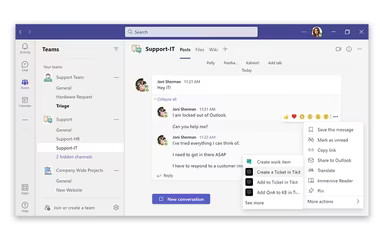
You can right-click any message in a Teams chat to transform it into a trackable ticket. This allows ticket creation directly from conversations without leaving Teams.
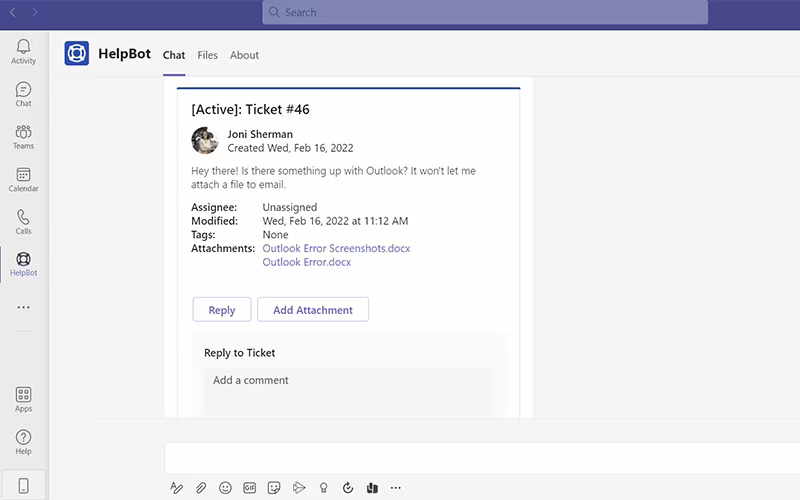
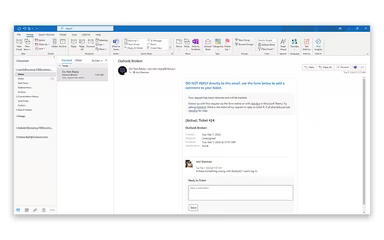
End users can submit requests through the Virtual Agent bot in Teams, an end-user web portal, or a configured Outlook mailbox based on their preference.
Agents oversee tickets, SLAs, lifecycle stages, and knowledge base articles from a dedicated web portal that is distinct from the end-user interface.
Repetitive tasks such as onboarding and approval routing are automated by linking Power Automate flows to ticket events, allowing configuration without coding.
User details and device inventory from Intune and Entra are accessible directly within the ticket for agents during resolution.
The platform tracks ticket volume, resolution times, and workload data by connecting Tikit to Power BI or Excel for comprehensive reporting at the dashboard level.
Schedule a free demo of Tikit to see the software in action.
Who Is Tikit For?
Tikit software is suitable for various industries and sectors, including:
Marketing
Human resources
Accounting
Software development
Information technology
Tikit Use Cases
Based on user reviews and current capabilities of Tikit, we have identified key scenarios where this software excels for operations teams:
Microsoft-Centric Organizations Managing Internal Support
Tikit is particularly effective in environments already utilizing Microsoft Teams and Microsoft 365. Employees can raise and monitor requests within their daily communication channels, minimizing the need for additional portals and logins. For organizations where IT has standardized on Microsoft technologies, this alleviates common challenges associated with getting non-technical staff to adopt new tools.
Small IT Teams Handling High Request Volumes
Tikit's ability to manage intake, updates, and resolutions without requiring multiple systems proves beneficial for small or individual IT teams. The setup process is straightforward, and onboarding new agents typically does not require extensive training. Numerous reviewers have noted they were operational within days. For teams seeking a structured process without the complications of an enterprise-level ITSM rollout, this efficiency is crucial.
Organizations Expanding ITSM Beyond IT
Tikit extends its utility beyond just IT support. HR teams addressing onboarding inquiries, finance departments handling procurement requests, and facilities teams managing maintenance tickets can effectively operate their own queues on a single platform. This standardizes how internal requests are managed across different departments while reducing reliance on separate tools with distinct contracts.
Teams Prioritizing Self-Service And Ticket Deflection
Tikit's virtual agent can intercept common questions before they reach an agent for organizations facing high volumes of repetitive requests. Employees receive answers through an intelligent chat flow driven by knowledge resources, ensuring that only unresolved issues escalate into the queue. This approach is especially relevant for support teams with limited personnel who cannot realistically address every incoming request manually.
Is Tikit Right For You?
If your organization has made significant investments in Microsoft 365, then Tikit software could be an excellent match due to its native design that enhances existing technology investments. The software complies with SOC 2 Type 2, GDPR, and HIPAA regulations to ensure the security of sensitive user information. It serves as a dependable enterprise service management solution that transcends IT functions to unify support across HR and finance departments.
If you still have questions about whether investing in Tikit software is right for you, please reach out to our customer support team at info@softwareseekers.com for further assistance.